
Messy CRM integrations do not just slow a team down, they corrupt the whole revenue system. From SDRs chasing duplicate leads to marketing misreading attribution, bad plumbing turns good data into noise. Scaling outbound with Apollo, Clay, or SmartLead takes more than swapping API keys, because the data underneath is always degrading. B2B contact data decays at about 22.5% a year, so an integration that is not built to clean and route data properly falls apart fast. This guide shows how to connect prospecting tools to Salesforce and HubSpot without contaminating your pipeline.
Why integration breaks, and what it costs
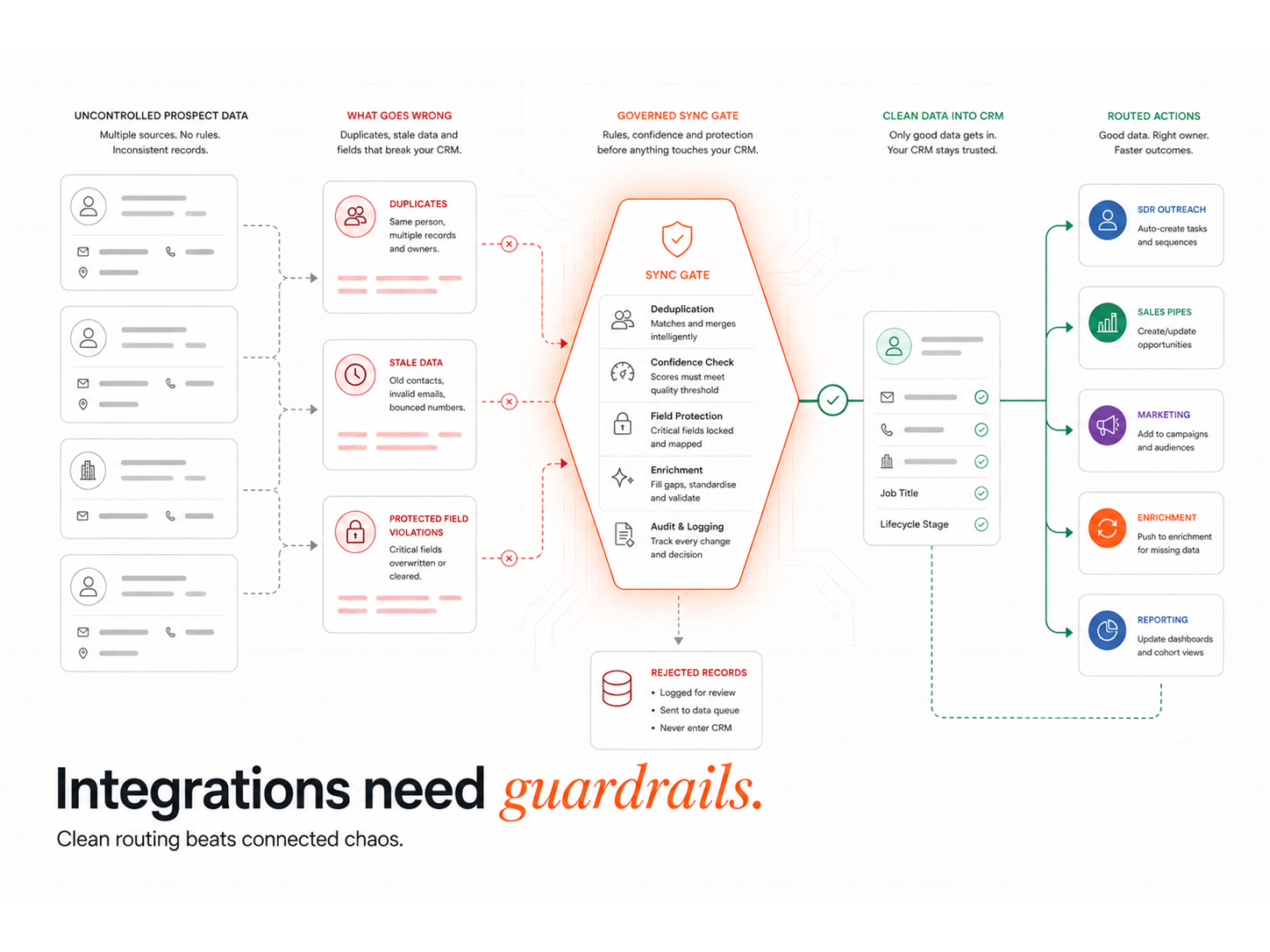
Most integration failures are predictable, and they are expensive. Validity's 2024 State of CRM Data Management report, surveying more than 600 CRM administrators, found 24% say less than half their CRM data is accurate and complete, and 31% lose at least 20% of annual revenue to poor-quality data. When prospecting tools write freely into your CRM with no governance, you manufacture exactly that problem at speed.
| Warning sign | What is causing it | The fix |
|---|---|---|
| Duplicate leads and contacts | No dedupe rule or matching key on sync | Set a single matching key and dedupe on write |
| Conflicting record ownership | Two tools writing to the same field | Define one source of truth per field |
| Stale or bouncing data | No enrichment cadence | Re-enrich on a schedule and handle bounces |
| Broken attribution | Source and campaign fields not mapped | Stamp source, medium, and sequence ID on every touch |
| Reps working dead leads | Unqualified records synced straight to sales | Route on a score threshold, not on every form fill |
Each of these has a clean fix, but only if you decide the rules before you connect the tools, not after the duplicates pile up. The hidden cost is trust: once reps stop believing the CRM, they keep their own spreadsheets, and your reporting stops reflecting reality. Fixing the plumbing is as much about keeping the team bought in as it is about clean records, and it underpins any signal-based marketing programme that depends on that data.
Set the data hierarchy before you connect anything
Clean automation depends on one decision: what is the source of truth. Salesforce or HubSpot should own lifecycle stage, ownership, and reporting, while prospecting tools feed enrichment and activity into that system rather than competing with it. Because contact data decays at roughly 2.1% a month, or 22.5% a year, the hierarchy also needs a re-enrichment cadence so records stay current instead of quietly rotting in the pipeline.
The play: write down which system owns each field, then enforce it in every sync. A field with two owners is a field that will conflict.
Map the integration: who writes what, and where
Before any data flows, map each tool to a role and a destination. The goal is that every tool writes only what it should, into fields it is allowed to own, so nothing overwrites the source of truth.
| Tool | What it does in the stack | Where it should write |
|---|---|---|
| Apollo | Prospecting and enrichment | Staged records, not straight into live CRM owners |
| Clay | Enrichment and scoring logic | A score and clean fields back to the CRM |
| SmartLead | Outbound email sending | Activity and reply data, with suppression respected |
| Salesforce / HubSpot | The source of truth | Owns lifecycle stage, ownership, and reporting |
The play: stage prospecting data first, enrich and score it, then promote only qualified records into live CRM ownership. Build this as a documented workflow, not a tangle of point-to-point syncs.
Watch out for two-way syncs with no clear winner. When both the prospecting tool and the CRM can overwrite the same field, the last write wins at random, and you get silent data corruption that is hard to trace. Make every field one-directional unless you have a deliberate reason not to. The same discipline carries into your wider lead generation automation.
Route on signals, not on everything
Syncing every contact into sales is how a CRM fills with dead weight. Most of your market is not buying right now: the LinkedIn B2B Institute's 95-5 rule holds that only about 5% of buyers are in-market at any time. Integration should reflect that, routing the 5% showing real intent to sales and keeping the rest in nurture.
The play: gate the hand-off on a score built from real buying signals, so only qualified accounts reach a rep. Everything below the threshold stays in an automated track until it earns the escalation.
Route the whole committee, and protect deliverability
An integration that only captures the form-filler misses the people who actually decide. Ebsta and Pavilion's 2024 B2B Sales Benchmarks, analysing 4.2 million opportunities across 530 companies, found successful deals involve nine engaged contacts by the solution stage, while lost deals average just two. Your integration should capture and route every stakeholder who touches an account, not a single record.
The play: sync the full buying group, route high-score records to a human fast, and make sure outbound sending respects suppression lists and opt-outs so deliverability and compliance hold as volume grows.
Watch out for letting outbound tools write to suppression and opt-out fields without rules. One bad sync can re-add unsubscribed contacts and put your domain reputation at risk.
Preserve attribution across the journey
If the integration does not carry source data, you lose the ability to see what worked. Deals are not single events: HockeyStack Labs, mapping real B2B journeys, found around 417 touchpoints on deals above US$100K. Every one of those touches needs to land in the CRM with its source, medium, campaign, and sequence ID intact.
The play: stamp attribution fields on every synced touch, so 60 to 90 days later you can still answer what actually drove the pipeline rather than guessing.
A safe rollout sequence
Connect the stack in order, testing each step before the next depends on it:
- Decide the source of truth and which system owns each field
- Set dedupe and matching rules before the first sync runs
- Stage and enrich prospecting data instead of writing it live
- Define the score and threshold that promotes a record to sales
- Map attribution fields and test that they populate end to end
- Turn on routing for qualified records, then monitor deliverability
Common integration mistakes
The biggest mistake is connecting tools before agreeing the data rules, which guarantees duplicates and ownership conflicts. The second is syncing everything to sales, which buries the 5% who matter under noise. The third is treating the integration as finished once data flows, when enrichment, dedupe, and attribution all need ongoing care.
When we build these integrations for clients, the first pass is deliberately narrow: one source of truth, one clean sync, one score. Widening only after that foundation holds is what keeps the CRM trustworthy. This is core GTM engineering work, connecting the stack so signals flow without breaking the system that records them.
Key takeaways
- Decide the rules first: name the source of truth and field ownership before connecting tools
- Stage, then promote: enrich and score prospecting data before it touches live CRM ownership
- Route the 5%: send only qualified, in-market accounts to sales
- Protect deliverability: respect suppression and opt-outs on every sync
- Keep attribution intact: stamp source data on every touch or lose the ability to improve
RevOps Tools
Integration is the lever that decides whether automation produces pipeline or chaos. The Revenue Operations Studio at Intelligent Resourcing sets the source of truth, sync rules, and orchestration so your CRM stays clean and SDRs work only qualified records.