
How to Go from Enrichment to Outbound Without Buying Lists
Going from enrichment to outbound without buying lists means building your own verified contact base in Clay, then sending only validated records through Smartlead. Clay enriches and checks each email, Smartlead sequences the clean ones, and bounce feedback flows back so the list stays accurate over time.
How does the Clay to Smartlead workflow actually work?
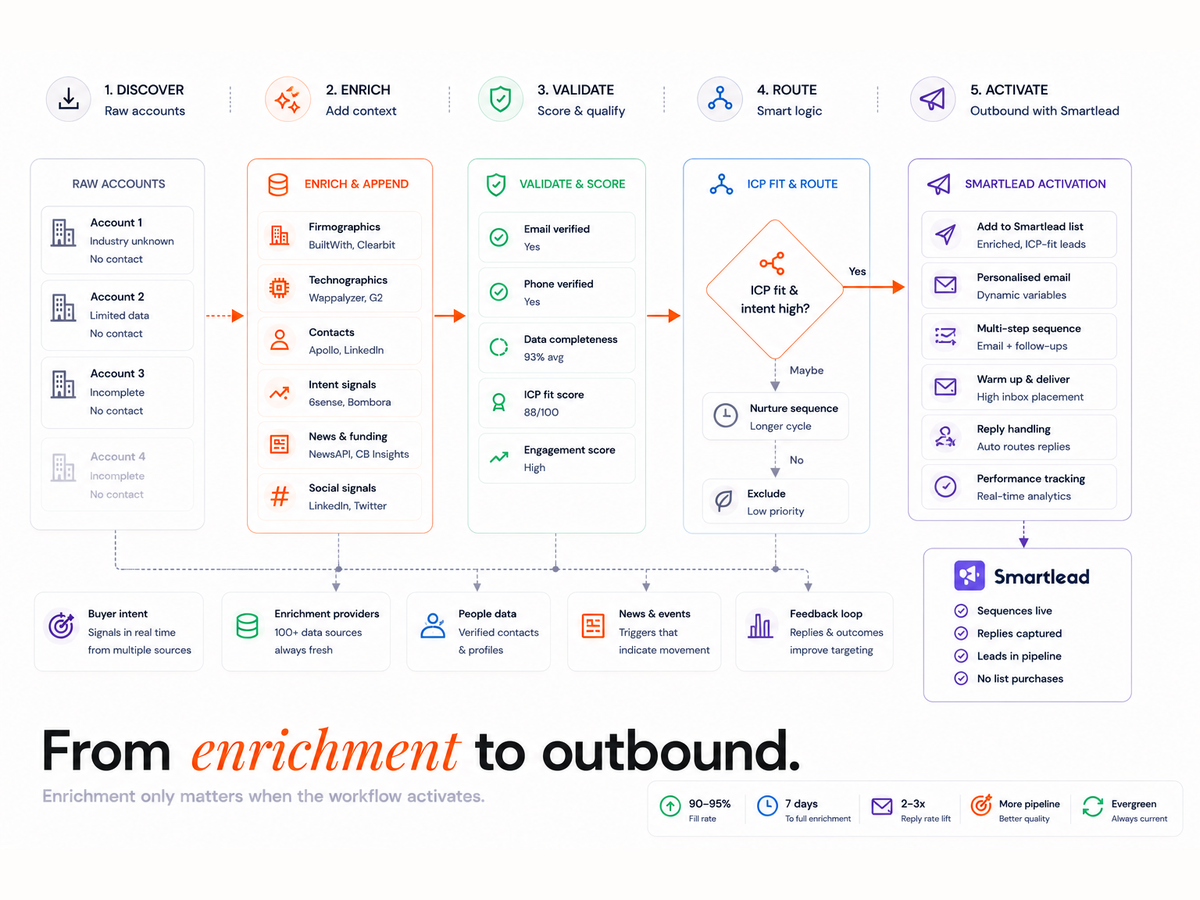
Clay is the enrichment and verification layer; Smartlead is the sending layer. Clay builds a contact table, runs a source waterfall, verifies each email, deduplicates, and pushes only validated records into Smartlead. Smartlead sequences them and sends bounce, reply and opt-out data back to Clay, which updates suppression lists.
- Clay enriches contacts through a waterfall of sources and verifies each email.
- Only validated, deduplicated records sync to Smartlead by API.
- Smartlead runs the sequence and warms the sending domains.
- Bounces, replies and unsubscribes flow back to Clay to suppress bad records.
This loop is what makes bought lists unnecessary. A purchased list is a one-time snapshot that decays the day you buy it, whereas this system refreshes itself. The same enrichment discipline drives a 90 to 95% enrichment fill in seven days, and the verified records can sync to your CRM through the Clay and HubSpot integration.
What do you need before connecting Clay and Smartlead?
You need a Clay workspace with enrichment sources connected, a Smartlead account with warmed sending domains, a Smartlead API key, and clear segment logic. Define who you are targeting before you enrich, because the ICP decides which fields Clay fills and which contacts pass verification.
- Clay, for enrichment and email verification
- Smartlead, for sequencing and domain warmup
- A CRM to hold the verified records (optional but recommended)
- n8n or a webhook layer, if you want custom feedback automation
Generate the Smartlead API key under Settings then Integrations, and connect it in Clay under Destinations. Set segment filters (persona, vertical, geography, company size) so Smartlead only ever receives complete, usable rows.
How do you set up the integration step by step?
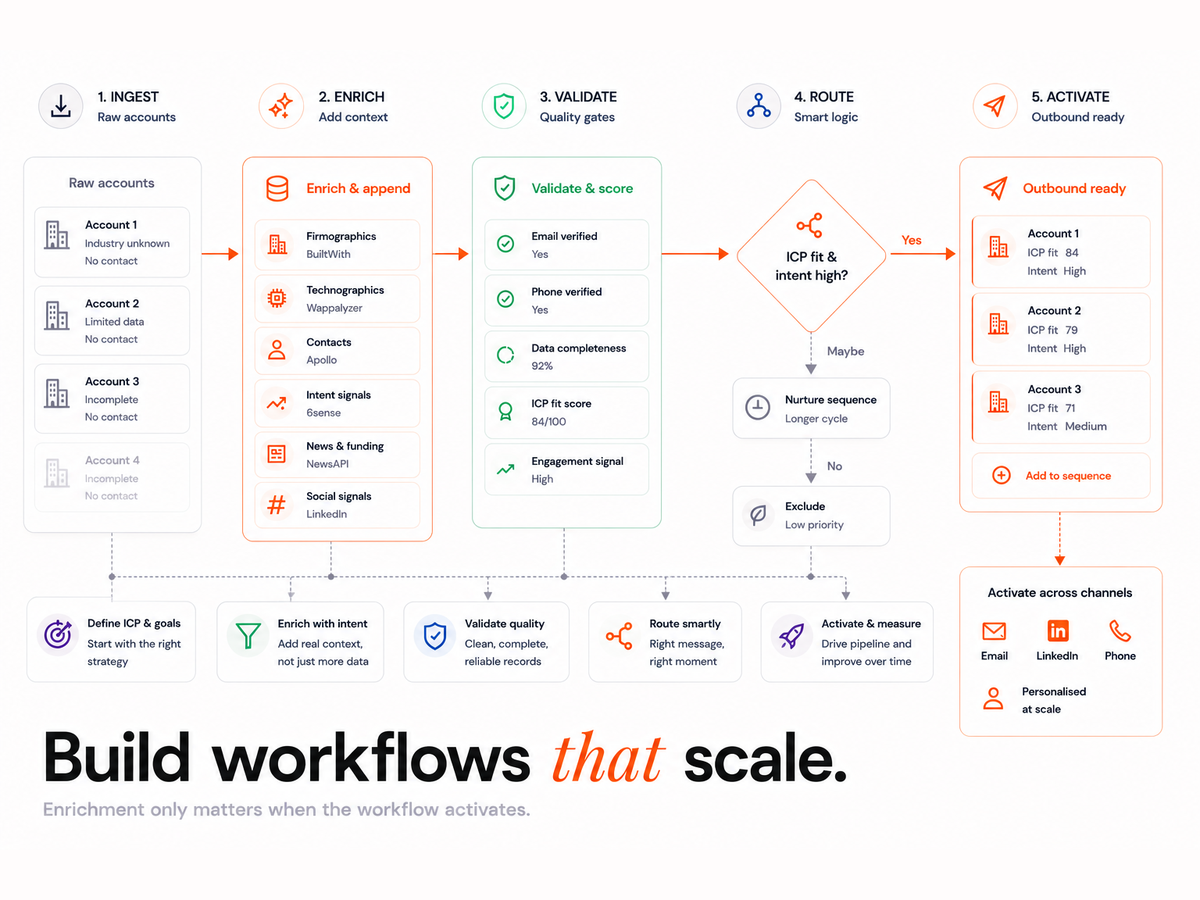
Work through nine stages: fields, enrichment, verification, tagging, the push to Smartlead, domain warmup, feedback capture, QA, and the refresh cadence. Each stage gates the next, so verification must pass before any record is allowed into a sequence.
Step 1: How do you define fields and segments?
Build a Clay table with consistent columns: company name, domain, email, LinkedIn URL, enrichment status and a Smartlead campaign tag. Clean column logic up front prevents empty merge tags later, which are a common cause of replies that read as obviously automated.
Step 2: How do you build the enrichment waterfall?
Stack sources by cost and accuracy: firmographic data first, then email discovery, then verification. Credits are spent only when a required field is missing, which controls cost while lifting fill rate. Keep LinkedIn URLs for context and personalisation.
Step 3: How do you verify emails and deduplicate?
Run every record through email validation before it can sync. Filter invalid addresses and hold catch-all domains for manual approval. Deduplicate on company plus email and keep the duplicate rate under 1.5%. Tight verification here is the same discipline behind reducing email bounce rates with Clay fallback logic.
Step 4: How do you tag and route leads?
Tag each lead with the campaign name, ICP category and SDR owner before the push. Tags make Smartlead reporting readable and let you attribute replies to the right segment and rep without manual reconciliation.
Step 5: How do you push clean leads to Smartlead?
Push only verified records by API, using an Update Existing rule to avoid duplicates, and stamp each batch with a timestamp and batch ID. Never bulk-import an unverified file; the verification gate in Step 3 is what protects the sending domain.
Step 6: How do you warm domains and throttle sends?
Warm every sending domain with Smartlead's built-in warmup before real sends, and cap volume per domain. Google's bulk sender guidelines require spam complaints to stay under 0.1%, and reputation degrades sharply past 0.3%, so rotate domains and keep daily volume conservative.
Step 7: How do you capture bounce and reply feedback?
Configure Smartlead to send bounce, reply and unsubscribe events back to Clay or your CRM by webhook. Feed every hard bounce and opt-out straight into a suppression list so the same address is never contacted again. This closed loop is what keeps the base clean over time.
Step 8: How do you run QA and observability?
Audit weekly: verification success rate, send volume, bounce trend and webhook logs. Automate alerts so a failing enrichment source or a bounce spike surfaces before it damages deliverability. Treat a bounce climb as a stop signal, not a monthly review item.
Step 9: How do you set the refresh cadence?
Re-verify the outbound base every 30 to 60 days. Contacts move and emails break, so a static base degrades fast. A timed refresh keeps the data evergreen and the campaigns compliant, the same orchestration logic behind automated B2B lead generation with Clay and n8n.
How do you protect deliverability and domain reputation?
Deliverability is won before the first send. Verify every address, authenticate the domain, warm it, and keep volume low enough that complaint rates stay tiny. Google and Microsoft tightened bulk-sender rules in 2024 and 2025, so the margin for a dirty list is now near zero.
The hard limits are specific. Google's sender guidelines cap the spam complaint rate at 0.1%, which is one complaint per thousand emails, and deliverability drops noticeably once it reaches 0.3%. Only verified emails should enter Smartlead, catch-all addresses need manual approval, and sender domains should rotate so no single domain carries the full daily load. Bought lists fail every one of these tests at once.
How do you keep the outbound base evergreen?
An evergreen base is refreshed on a schedule, not cleaned once. The HubSpot database decay benchmark puts B2B data decay at 2.1% per month, an annualised 22.5%, so a list left alone loses about a fifth of its accuracy in a year. A 30 to 60 day re-verification cycle is what offsets that rate.
Sync Smartlead opt-outs back into Clay and flag unsubscribed contacts permanently, because re-contacting an opt-out is both a deliverability risk and a compliance breach. In Australia the ACMA Spam Act rules require a functioning unsubscribe and consent records, which a synced suppression list maintains automatically. Clean routing and scoring then run on data you can trust, the foundation of signal-based lead scoring in Clay.
Which metrics prove the workflow is working?
Five metrics show whether the system is healthy: bounce rate under 3%, duplicate rate under 1.5%, profile fill rate above 90% within seven days, time-to-first-touch under 48 hours, and reply rate by segment. Track them weekly so a regression is caught before it reaches the sending domain.
- Bounce rate: below 3%
- Duplicate rate: below 1.5%
- Profile fill rate: 90% or higher within 7 days
- Time-to-first-touch: under 48 hours
- Reply rate: tracked per segment, not just per campaign
What breaks a Clay to Smartlead workflow?
The failures are consistent: skipping verification, importing unclean contacts, leaving merge tags empty, and never syncing Smartlead feedback back to Clay. Each one quietly raises the bounce rate or the complaint rate until the domain reputation collapses and even valid sends land in spam.
- Skipping verification or sending to catch-all addresses
- Importing unclean or bought contacts
- Empty merge tags that expose the automation
- No feedback sync, so bounced and opted-out contacts get hit again
Most of this is an orchestration problem rather than a tooling one, which is why teams often bring in a Clay workflow specialist to design the gates before scaling. The same care applies when you extend outbound into LinkedIn prospecting workflows.
Where do the costs come from?
Cost rises with enrichment depth, verification volume, reprocessing of rejected contacts, and the frequency of the refresh. Plan the field list and cadence deliberately, because verifying every field on the whole base every week turns a predictable bill into runaway credit spend for little added freshness.
- Enrichment depth: the number of fields filled per record
- Verification volume: how many addresses are checked per cycle
- Reprocessing: retrying rejected or catch-all contacts
- Refresh frequency: how often the base is re-verified
Clay Workflows
Book a 30-minute workflow audit. We focus on deliverability, lead velocity, and an evergreen CRM.
FAQs
Can you integrate Clay with Smartlead without n8n?
Yes. Clay has a native Smartlead destination, so for most workflows you connect the Smartlead API key in Clay and push verified contacts directly, with no n8n or Zapier needed. You only add n8n when you want custom feedback automation, such as routing bounce and reply events into other systems beyond the standard suppression sync.
How do you make sure Smartlead only sends to verified emails?
Verify every address in Clay before the push, and only sync records that pass. Filter out invalid emails and hold catch-all domains for manual approval rather than auto-sending to them. Because the verification gate runs before the Smartlead sync, no unverified address can enter a sequence, which is what keeps the bounce rate under 3%.
How often should you refresh the enrichment?
Re-verify the outbound base every 30 to 60 days. B2B contact data decays roughly 2.1% per month as people change roles and companies, so a base left untouched degrades quickly. A timed refresh keeps emails valid, suppression current, and the campaigns compliant, rather than relying on a one-off clean that is stale within a quarter.
What bounce rate is healthy for cold outbound?
Keep the bounce rate under 3%, and ideally closer to 1 to 2%. Mailbox providers treat bounce rates above 5% as a red flag that damages sender reputation and pushes future sends to spam. Verifying addresses before they reach Smartlead is the single most effective way to hold the bounce rate in the safe range.
How many emails can you send per domain per day?
Keep daily volume per sending domain conservative and rotate across multiple domains rather than pushing one hard. Google's bulk sender guidelines require spam complaints to stay under 0.1%, and deliverability drops once complaints reach 0.3%, so low per-domain volume plus warmup is what protects placement at scale.
Do bought lists really hurt deliverability?
Yes. A bought list is unverified and stale, so it bounces heavily on the first send, which spikes the bounce and complaint rates that mailbox providers use to judge sender reputation. One bad send can undo months of domain warmup. Enriching and verifying your own contacts avoids the risk entirely.