
How does the Clay to HubSpot architecture actually work?
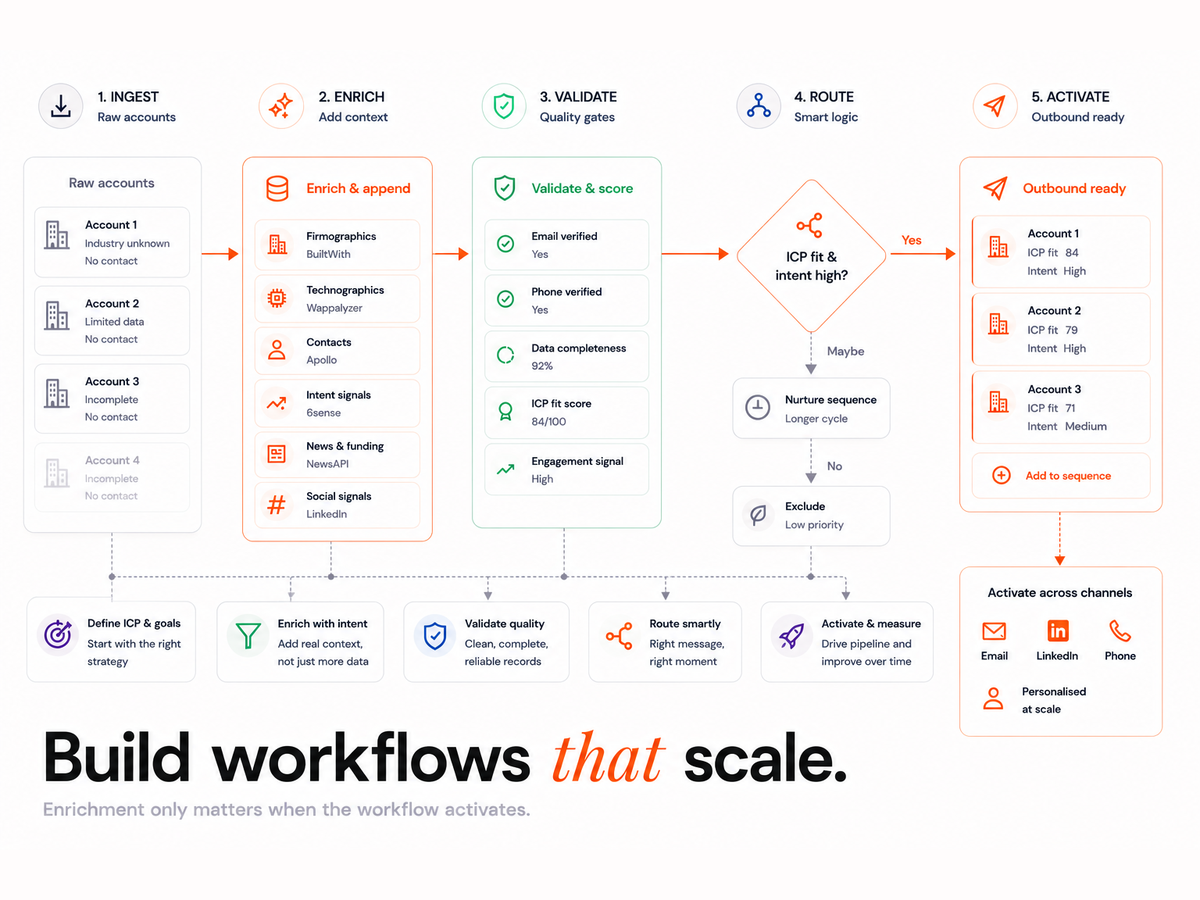
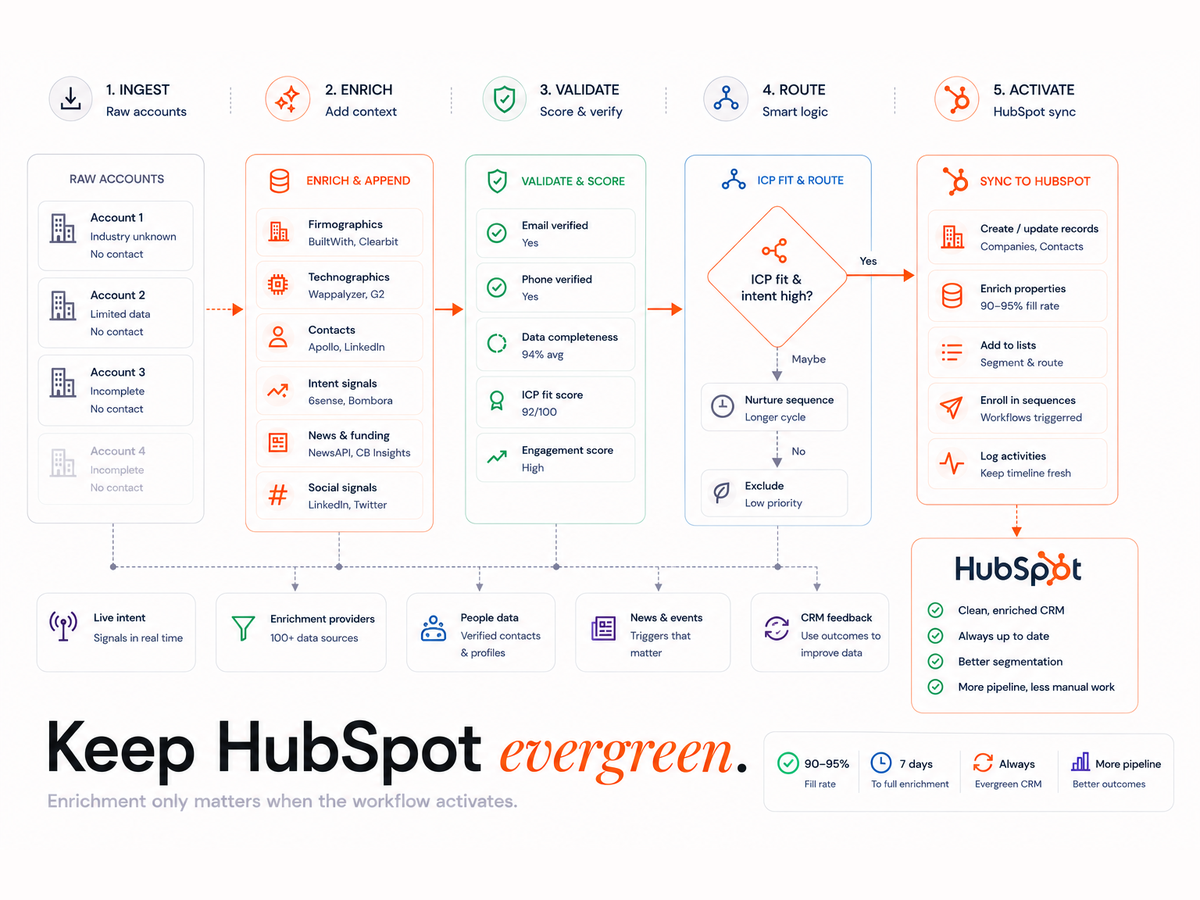
Clay sits in front of HubSpot as the enrichment and orchestration layer. It pulls raw contacts, runs them through a source waterfall, verifies and deduplicates each record, assigns an owner, then syncs clean data into HubSpot. Sequencers read from HubSpot and log activity back, creating a loop that refreshes contacts over time.
- Clay pulls raw contact data from multiple sources such as LinkedIn, Apollo and internal lists.
- Each contact is enriched through a custom waterfall, verified, deduped and assigned an owner.
- Cleaned data syncs into HubSpot for sales and marketing engagement.
- Sequencers pull from HubSpot and log activity back, which feeds the next refresh.
The integration touches HubSpot Contacts, Companies, Owners and custom enrichment fields. Clay sends updates by API and webhook, and the sync respects field protections so it never clashes with sales inputs. The reason the loop matters is structural: US median job tenure fell to 3.9 years in January 2024, and just 2.7 years for workers aged 25 to 34, according to the US Bureau of Labor Statistics. People move, so contact records rot unless something re-checks them.
What do you need before you connect Clay to HubSpot?
You need super-admin access to HubSpot, API or OAuth credentials for Clay, access to your enrichment sources, and sequencer credentials if you sync outbound tools. Review HubSpot API rate limits and object quotas first, because the sync volume of a full enrichment run hits them quickly.
- Super-admin access to HubSpot
- API keys or OAuth access for Clay
- Access to enrichment sources such as Clearbit and Apollo
- Sequencer credentials, if syncing outbound tools
Define your Ideal Customer Profile before you design the flow. The ICP decides which fields Clay fills, which contacts pass verification, and how dedupe is applied. Clay's integration documentation lists the API prerequisites for each connected source.
How do you set up the Clay to HubSpot integration step by step?
Work through nine stages in order: property mapping, dedupe, the enrichment waterfall, verification gates, routing, sync rules, the refresh policy, observability, and a pilot. Each stage gates the next, so a clean pilot on 1,000 records is what tells you the system is safe to scale.
Step 1: How do you map properties and objects?
Map required HubSpot fields such as email and company name, then add custom enrichment fields like enrichment_status, verification_score and source_tag. Do not map Clay fields directly onto sales-owned fields like job title or phone. Use a backup field such as job_title_clay and a sync rule that writes only when the target field is empty.
Step 2: How do you set the dedupe strategy?
Clay deduplicates on email, domain, LinkedIn URL or custom keys. Use multi-key logic with a match threshold to cut false positives: match if email equals an existing record, OR if LinkedIn and domain both match, at an 80% score threshold. Normalise legal and trade names with a firmographic source before syncing companies.
Step 3: How do you build the enrichment waterfall?
Stack sources in order of cost and accuracy: internal CRM data first, then LinkedIn, then free APIs, then paid sources like Clearbit and Apollo. Credits are consumed only when a mandatory field is missing, which keeps cost down while maximising fill rate. The same waterfall logic drives a 90 to 95% enrichment fill in seven days when it is tuned correctly.
Step 4: How do you set verification gates?
Run each record through verification before it reaches HubSpot: SMTP email validation, MX and SPF domain checks, and phone formatting with a carrier lookup. Hold low-confidence results for manual review. Tight verification is what keeps deliverability high, the same discipline behind reducing email bounce rates with Clay fallback logic.
Step 5: How do you handle routing and ownership?
Map contacts to HubSpot owners with routing logic tied to region, vertical or lead source. Clay fetches owner IDs by API and attaches them during sync. Define the rules in a routing matrix, and set fallback owners for when a territory match fails or an owner is inactive, so no enriched contact lands unassigned.
Step 6: How do you set sync rules and triggers?
Use one-way sync from Clay to HubSpot in almost every case. Bi-directional sync risks overwriting sales work unless you have field-level protections. Protect manually edited fields with conditions: sync only when job_title is empty, and skip the sync when the last editor was a sales user.
Step 7: How do you set the refresh and evergreen policy?
An Evergreen CRM needs a refresh cadence, not a one-off clean. Re-verify contacts every 90 to 180 days, recheck company firmographics quarterly, and update sequencer handoffs weekly. Build suppression into Clay boards so Do Not Contact records, unqualified leads and unsubscribed emails are never re-enriched.
Step 8: How do you set observability and QA?
Track email bounce rates after the sequencer, fill percentage across key fields, and any sudden drop in enrichment rates. Clay sends webhook alerts and keeps source logs; combine these with HubSpot analytics for end-to-end visibility. Export logs weekly to catch a failing source before it pollutes the CRM.
Step 9: How do you move from pilot to scale?
Run a 1,000-record pilot to test dedupe, sync and QA. Review fill rate against credit usage, bounce rate and direct sales feedback, then tune dedupe thresholds, field mappings and cadence before scaling past 10,000 records. This same orchestration discipline underpins automated B2B lead generation with Clay and n8n.
How do you keep the CRM evergreen after launch?
You keep it evergreen by refreshing on a schedule rather than on activity alone. HubSpot reports that B2B data decays 2.1% per month, an annualised 22.5%, so a database left untouched loses roughly a fifth of its accuracy in a year. A timed enrich-and-verify loop is the only thing that offsets that rate.
Update lifecycle stages in parallel with enrichment: move a contact to Recycle when its email is invalid, and promote to SQL only when firmographic criteria are met. The HubSpot database decay benchmark is the reason cadence beats one-off clean-ups. Four rules keep the system honest: never overwrite a field without fallback logic, log every sync and rejection, refresh on time rather than on activity, and enrich only the fields you actually use. Scoring and routing then run on data you can trust, the foundation of signal-based lead scoring in Clay.
Which metrics prove the integration is working?
Five metrics show whether the Evergreen CRM is holding: fill rate above 85% on key fields, duplicate rate under 3%, bounce rate under 5%, time-to-first-touch after sync, and the contact-to-opportunity conversion rate. Track them weekly so a regression surfaces before it reaches the sales team.
- Fill rate: aim for 85% or higher across key fields
- Duplicate rate: keep under 3%
- Bounce rate: stay below 5%
- Time-to-first-touch: measure post-sync latency
- Sales conversion: contact to opportunity
The payoff is reclaimed selling time. Salesforce's State of Sales research found that representatives spend under 30% of their time actually selling, with admin and data entry consuming much of the rest. A CRM that maintains itself returns that time to the pipeline.
What are the most common Clay to HubSpot mistakes?
The recurring failures are predictable: overwriting sales-edited fields without protection, relying on a single dedupe key, skipping verification on free leads, forgetting to suppress old contacts, and running no refresh cadence so data rots. Each one quietly degrades the CRM until routing and reporting stop being trustworthy.
- Overwriting sales-edited fields without protection
- Using only one dedupe key, because email alone is not enough
- Skipping verification on free leads
- Forgetting to suppress old or opted-out contacts
- Running no cadence, so the data decays unchecked
Avoiding these is mostly a question of who builds the system. The work is documented enough to learn, but the orchestration choices are where it succeeds or fails, which is why teams often bring in a Clay workflow specialist for the setup phase.
Where do the real costs accrue?
Cost is not only enrichment credits. It rises with sync volume, the depth of enrichment, reprocessing rejected contacts, and high-frequency refreshes. Plan the cadence and the field list deliberately, because an over-broad refresh on every field, every week, is what turns a predictable bill into runaway API spend.
- Sync volume: total record updates per day
- Enrichment depth: the number of fields filled per record
- Reprocessing: retrying rejected contacts
- Refresh frequency: how often the whole base is re-verified
Clay Workflows
Book a 30-minute workflow audit to get a custom enrichment waterfall design, sync rules, and an Evergreen CRM refresh policy for your stack.
FAQs
How often should you refresh CRM data in an evergreen setup?
Re-verify contacts every 90 to 180 days, recheck company firmographics quarterly, and update sequencer handoffs weekly. B2B data decays around 2.1% per month, so a fixed cadence is what offsets the loss. Refresh on time rather than on activity alone, because inactive records decay just as fast as active ones.
Should the Clay to HubSpot sync be one-way or bi-directional?
Use one-way sync from Clay to HubSpot in almost every case. Bi-directional sync risks overwriting fields that sales has edited unless you have strict field-level protections in place. One-way sync, combined with rules that write only to empty fields, keeps Clay enrichment and human sales input from clashing.
How do you stop Clay from overwriting sales-edited fields?
Map enrichment data to backup fields such as job_title_clay rather than the live sales field, then add sync conditions. Write only when the target field is empty, and skip the sync when the last editor was a sales user. This protects manual work while still filling genuine data gaps automatically.
What dedupe keys work best for HubSpot?
Email alone is not enough, because one person often has several addresses. Use multi-key logic: match if the email equals an existing record, or if both LinkedIn URL and company domain match, at an 80% confidence threshold. Normalise legal and trade company names with a firmographic source before syncing.
What fill rate and bounce rate should you expect?
A well-tuned waterfall holds fill rate above 85% on key fields and keeps the duplicate rate under 3%. With verification gates running before each sync, email bounce rate should stay below 5%. Track these weekly so a failing enrichment source is caught before it affects deliverability or routing.