
Why Are Email Bounce Rates Rising in B2B Outreach?
Email bounce rates rise because B2B contact data decays at 3.6% per month. Every bounced send erodes sender reputation and removes a reachable contact from your pipeline if no fallback exists.
Why email bounce rates are rising
Healthy bounce rates are low but fragile. Validity found the average total email bounce rate in 2023 was 1.26% (0.05% hard, 0.84% soft, 0.38% block).The problem is not the baseline, it is decay: ZeroBounce reports email lists lose at least 23% a year, so a clean list in January is materially worse by mid-year.
The cost of poor deliverability: domain health, wasted credits, missed leads
Every bounce damages sender reputation, wastes enrichment credits and SDR time, and lowers inbox placement for the messages that do land. In B2B the decay can spike sharply: RevenueBase recorded B2B email decay hitting 3.6% in a single month (November 2024), well above the traditional 1.5 to 2% monthly rate. Left unmanaged, that is a pipeline leak, not a data footnote.
Limitations of basic email validators
Most validators (the kind baked into Apollo or Instantly) run a rigid binary check: valid or invalid. They give you a verdict, not a next step. When an address fails, the lead simply drops out of the workflow, even when that same person is perfectly reachable on another channel.
Why Does Pass/Fail Email Validation Kill Pipeline?
Pass/fail validation discards every invalid email with no recovery step. At a realistic 15% list invalidity rate, that writes off 15% of enrichment spend and removes qualified contacts from the workflow entirely. The problem is not the bounce but the absence of a next action.
Pass/fail logic isn't smart logic
Binary validation treats an invalid email as a dead end. If 15% of a list is invalid (a realistic figure at typical decay rates), that is 15% of your enrichment spent producing nothing, with no attempt to recover the contact. Pass or fail is a verdict; it is not a workflow.
Dead ends in your workflow equal lost revenue
When invalid emails just stop, someone has to notice, export the rejects, find alternatives, and re-import them. That manual reprocessing rarely happens consistently, therefore good-fit leads exit the pipeline with no record of the drop. The momentum dies in a spreadsheet and the cost is not visible until pipeline velocity drops.
The missed opportunity: leveraging available LinkedIn data
Many contacts with a dead email address are active on LinkedIn right now. A rigid tool cannot see that; it only knows the email failed. The opportunity is to treat a failed email as a routing decision, not a deletion, and send that contact down a LinkedIn path instead. This is the start of a Signal Response Protocol applied to data quality.
How Clay Uses Waterfall Validation Logic
Clay replaces binary email checks with a 4-tier waterfall: validate deliverability, detect catch-all domains, apply a risk score, then route. Each tier adds decision context so borderline addresses are handled with a defined action rather than discarded. The result is graded routing, not a yes/no verdict.
Step-by-step breakdown of Clay's validation hierarchy
Clay replaces the binary check with a waterfall: validate the email, detect catch-all domains, apply a risk score, and only then decide the route. Each step adds context, so the system makes a graded decision rather than a yes or no.
- Validate email deliverability (via Debounce or similar).
- Detect catch-all domains that pass validation but still risk bouncing.
- Apply a risk score so borderline addresses are handled, not guessed.
- Route: send, skip, or reroute to LinkedIn based on the score.
From bounce detection to LinkedIn fallback
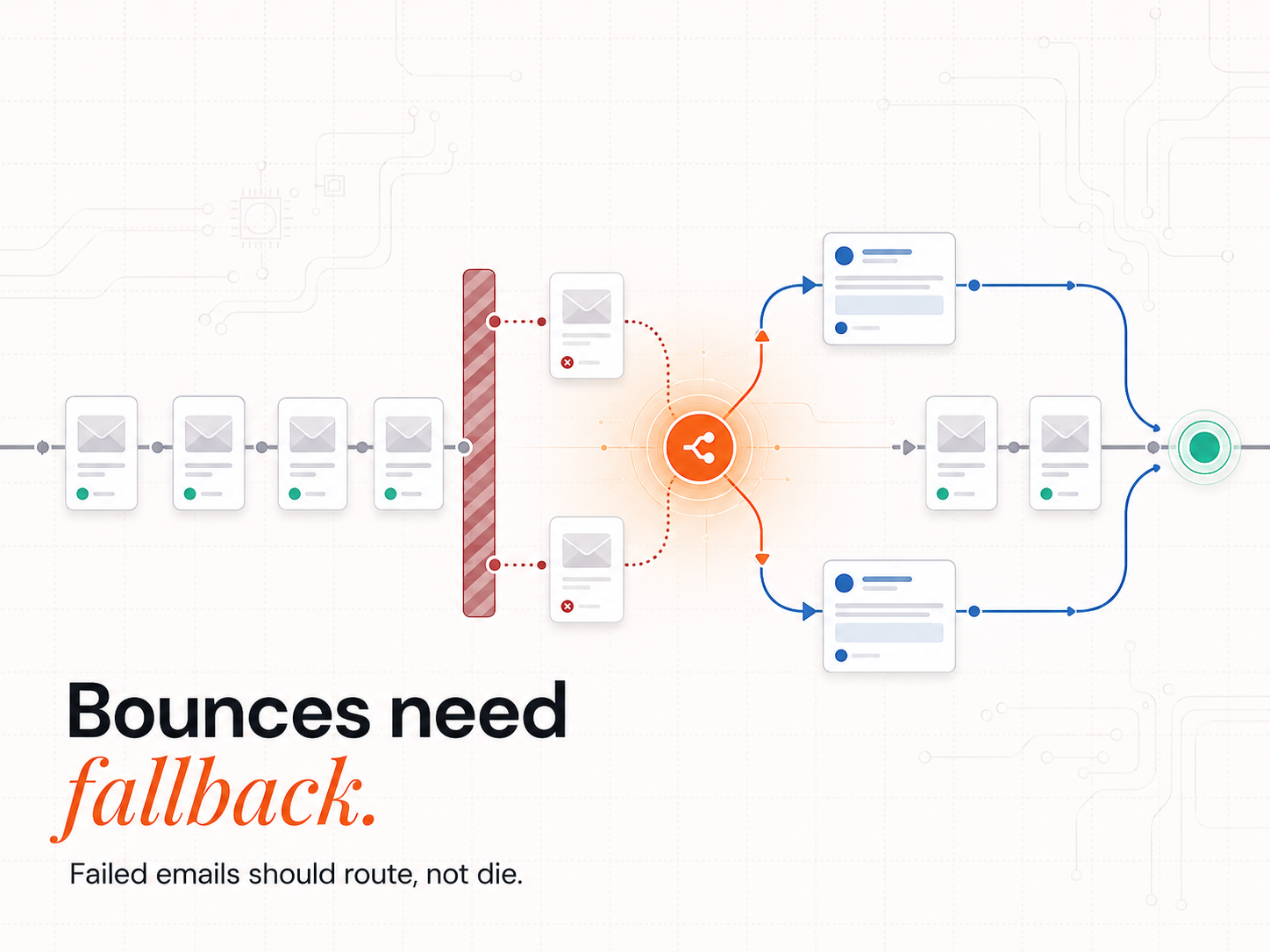
When an address fails validation, Clay does not discard the record. It checks for an active LinkedIn profile and routes the contact into a LinkedIn outreach stream automatically. The failed email becomes a channel switch, not a lost lead.
Risk scoring and catch-all domains
Catch-all domains accept any address and so pass naive validators while still bouncing in practice. Clay scores these separately, and you decide the policy: send, skip, or reroute. That control is what keeps a catch-all from quietly inflating your bounce rate.
What Happens When Clay Detects an Invalid Email in a Live Workflow?
When Clay detects an invalid email, it flags the record and routes it to a LinkedIn sequence in the same workflow pass: no manual export, no re-import. A 1,000-lead batch processes in one pass: valid emails queue for send, invalid ones route to LinkedIn, and catch-alls hold for policy review. No lead exits the workflow without a defined next action.
Invalid email? Clay reroutes automatically
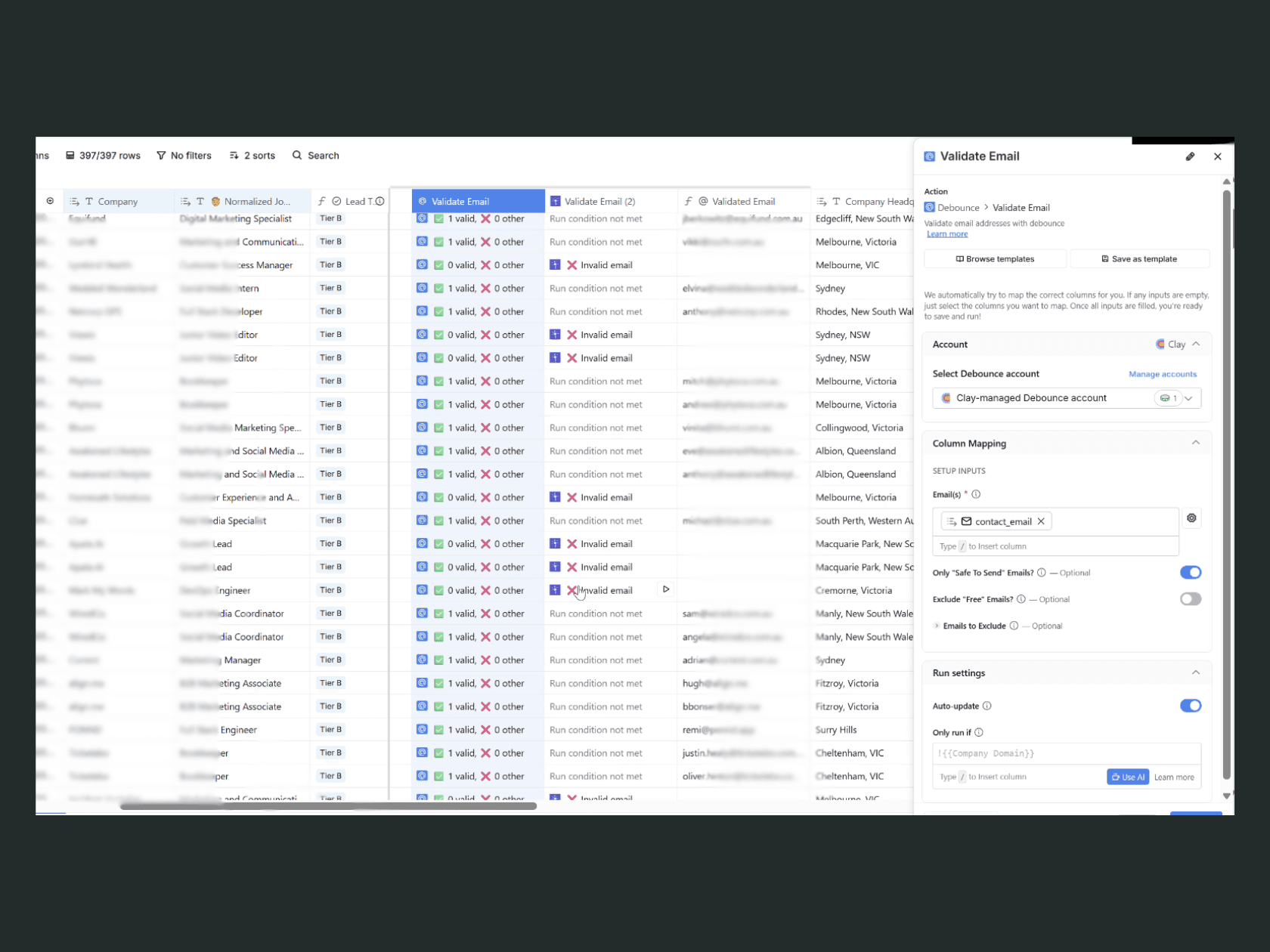
In a live Clay workspace, a record whose email fails validation is flagged and routed to a LinkedIn path in the same pass, with no human step. The screenshot below shows the Validate Email column doing exactly that across a working list.
No lead left behind, without manual reruns
Across a batch of 1,000 leads, Clay handles every record in one pass: valid emails queue for sending, invalid ones rerouted to LinkedIn, and catch-alls are scored and held for review. Nobody re-runs a rejected list by hand, so the whole batch stays in motion.
Outcome: consistent prospect flow despite bad data
Even at a 20% decay rate, campaign flow and reply rates stay stable, because the workflow adapts to bad data instead of breaking on it. The Evergreen CRM principle applies here: hygiene runs continuously inside the workflow, not as a quarterly cleanup.
How Does Fallback Logic Increase Campaign ROI?
Fallback logic increases campaign ROI by recovering contacts a binary tool discards. Instead of writing off the invalid portion of a list, Clay routes those contacts to LinkedIn.
Why fallback logic boosts campaign ROI
Smart rerouting salvages the leads a binary tool discards, therefore the same enrichment spend produces more conversations. Instead of writing off the invalid slice of a list, Clay recovers them through LinkedIn, because every reachable contact that exits the workflow uncontacted is pipeline attrition, not data cleanup.
Fewer bounces, more replies
Routing risky addresses away from the send protects your sender score, which lifts inbox placement for the valid ones. Fewer bounces and better placement compound into more replies from the same list. Routing by signal beats blasting by volume.
Automation reduces human error in prospecting
Building the fallback into the workflow removes the forgotten reruns and stale contacts that creep into manual prospecting. The same approach that powers a top-rated lead gen workflow applies here: let the system handle the volume decisions so humans work the conversations.
How Do You Build Predictable Pipeline With Decaying Data?
Don't discard leads, adapt your strategy
Pass/fail logic fails real workflows with high decay. Adapting the strategy, by rerouting rather than discarding, is what keeps a list productive. Using online signals to generate B2B leads compounds the effect: the data layer and the signal layer reinforce each other.
Clay turns dead ends into touchpoints
Smart fallback is the difference between silence and a conversation. It is one piece of the broader GTM engineering layer that connects data quality to pipeline, so every contact that can be reached, is reached, through the right channel and inside a Verified Buying Window.
How do email validators work in Clay?
Clay validates deliverability (via Debounce or similar), then applies hierarchical waterfall logic: catch-all detection, risk scoring, and a routing decision. When an email is risky or invalid, it reroutes the contact to a LinkedIn path rather than discarding the lead.
What happens when Clay detects a catch-all domain?
Catch-all domains accept any address and can still bounce, so Clay scores them separately rather than passing them blindly. You set the policy: include, exclude, or reroute, so a catch-all never quietly inflates your bounce rate.
Can I prioritise LinkedIn over email automatically?
Yes. Routing preferences let you make LinkedIn the primary channel when an email is risky or unavailable, so the workflow reaches the contact on the channel most likely to work rather than defaulting to a send that bounces.
How does fallback logic affect my deliverability rate?
It cuts hard bounces by keeping risky addresses out of the send, which preserves domain health and improves inbox placement for your valid contacts. Fewer bounces and better placement compound into higher reply rates from the same list.
Is Clay’s fallback logic customisable for different workflows?
Yes. You set the routing conditions and weight data types by persona or segment, so the same waterfall can behave differently for enterprise accounts versus SMB, or for inbound versus outbound lists.
Clay Workflows
Still relying on tools that stop at "invalid email"? The Revenue Operations Studio at Intelligent Resourcing builds the Clay fallback logic that reroutes, adapts, and keeps your pipeline alive: waterfall validation, risk scoring, LinkedIn fallback, and an Evergreen CRM that stays clean as your list decays.