
What are the must-have CRM automation features in 2026?
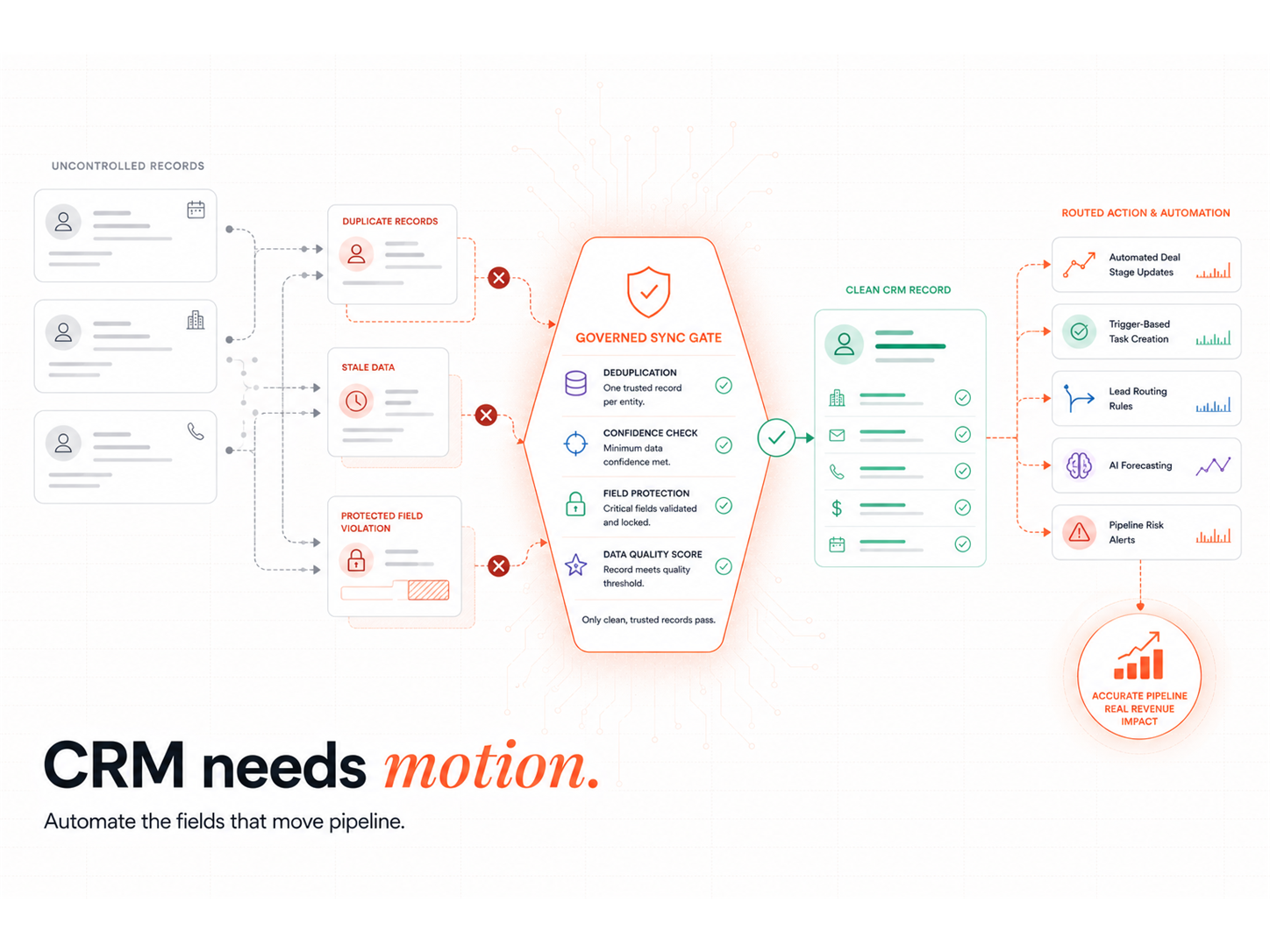
The must-have features are the five that remove manual work and keep the pipeline truthful: automated deal-stage updates, trigger-based task creation, lead-routing rules, AI forecasting, and pipeline risk alerts. Each one replaces a thing a rep currently forgets to do. The test for any feature is simple: does it fire off a real signal or buyer action, or does it just react to an internal field change?
Why does manual CRM data entry cost B2B teams so much?
Manual entry costs teams both time and truth. Reps lose roughly 25% of the week to manual CRM updates, and the records they do enter rot fast: B2B contact data decays 22.5%+ a year. Automation fixes both. It updates fields from rep and buyer behaviour, so the pipeline reflects reality without depending on memory. That continuous-hygiene model is the Evergreen CRM, and it is the foundation every other automation sits on.
How do automated workflows keep the pipeline current?
Automated workflows update deal stages and create tasks based on activity, not on a rep remembering to log it. A proposal opened moves a deal forward, a booked meeting triggers the next task, 30 days of silence flags a stalled deal. This logic removes pipeline lag and makes forecasts trustworthy. The same workflow rigour that connects HubSpot and n8n is what lets automation hold up at scale rather than breaking on edge cases.
How does lead routing reduce bottlenecks?
Lead routing assigns each lead by territory, product, or availability the instant it arrives, so no lead waits in a queue. Speed is the whole point: a fast response makes you 21x more likely to qualify a lead than waiting half an hour. When routing is wired to a Signal Response Protocol, a high-fit, high-intent lead reaches a rep within minutes of a Verified Buying Window opening, rather than sitting in a round-robin overnight.
What does AI forecasting actually do in a modern CRM?
AI forecasting scores each deal on real signals (engagement, cycle length, buyer behaviour) and adjusts close probabilities automatically, so the forecast is not a rep's gut feel. Companies using AI-assisted forecasting report a 15 to 25% improvement in accuracy. It also flags risk: deals gone quiet, accounts with no stakeholder engagement, and pipeline assigned to overloaded reps. Real-time lead scoring is the input that makes the forecast trustworthy.
Which CRM fits your team for automation in 2026?
The right CRM depends on team size and automation maturity, not feature count. All four leaders now ship an AI layer; the difference is depth and setup cost. A CRM returns $3.10 per dollar spent, so the question is which one your team will actually operate.
| CRM | Best for | 2026 AI layer | Trade-off |
|---|---|---|---|
| HubSpot | CRM-led growth teams | Breeze AI agents | Less depth in enterprise customisation |
| Salesforce | Enterprise, complex pipelines | Einstein + Agentforce | Steep setup and admin overhead |
| Pipedrive | SME, straightforward process | AI Sales Assistant | Lighter AI than enterprise tools |
| Zoho | Cost-conscious, customisation | Zia AI | UI less intuitive |
The buyer-intent signals that matter most decide which automation is worth building, whichever CRM holds the records.
What are the common CRM automation gaps, and how do you fix them?
The common gaps are stale workflows, broken integrations, and stage logic that no longer matches how deals actually progress. Fix them by auditing workflows quarterly, verifying two-way sync before trusting any integration, and mapping automation rules to buyer milestones (emails, meetings, decisions) rather than internal guesses. The clean Clay-to-HubSpot field mapping is the kind of integration discipline that keeps automation from silently breaking.
RevOps Tools
Most CRMs are a system of record. The pipeline comes from the automation wired around them. The Revenue Operations Studio at Intelligent Resourcing builds deal-stage logic, routing, and AI forecasting around the Verified Buying Window, with an Evergreen CRM keeping the data clean and Signal Response Protocols firing on real intent.
FAQs
What CRM automation features matter most in 2026?
Automated deal-stage updates, trigger-based task creation, lead-routing rules, AI forecasting, and pipeline risk alerts. The differentiator is whether these connect to real buying signals or only to internal activity. CRM-native automation handles internal activity well; capturing external signals usually needs a best-of-breed layer.
How do automated workflows improve pipeline accuracy?
They update the pipeline from real rep and buyer activity, reducing the lag between what happens and what the CRM shows. That produces cleaner data and better forecasts. Continuous hygiene, rather than quarterly cleanups, is what keeps the forecast from decaying between reviews.
What does AI forecasting look like in a modern CRM?
Probability scoring, real-time pipeline weighting, and forecast categories (committed, best case, pipeline) based on behaviour and deal history. The best implementations adjust deal probability automatically as new signals arrive, rather than relying on a rep's manual stage guess.
How do CRMs integrate with prospecting tools?
Through native integrations or middleware that sync contacts, track activity, and automate handoffs. The reliability of those integrations is the single biggest determinant of whether the automation holds up. Verify two-way sync, custom-field support, and API limits before you trust any connection.
How does CRM automation help with resource planning?
It gives visibility into rep workloads, pipeline velocity, and deal distribution, which supports accurate hiring and lead allocation. Live pipeline-velocity data lets operations model future headcount against real throughput rather than guesswork.
Is native CRM automation enough, or do I need extra tools?
Native automation covers internal activity well. Capturing external buying signals (funding, hires, tech changes) usually needs a best-of-breed layer feeding the CRM. Start native, add the signal layer when CRM-native AI cannot see the signals you need.