
What Criteria Should You Use to Evaluate Marketing Content Automation Tools?
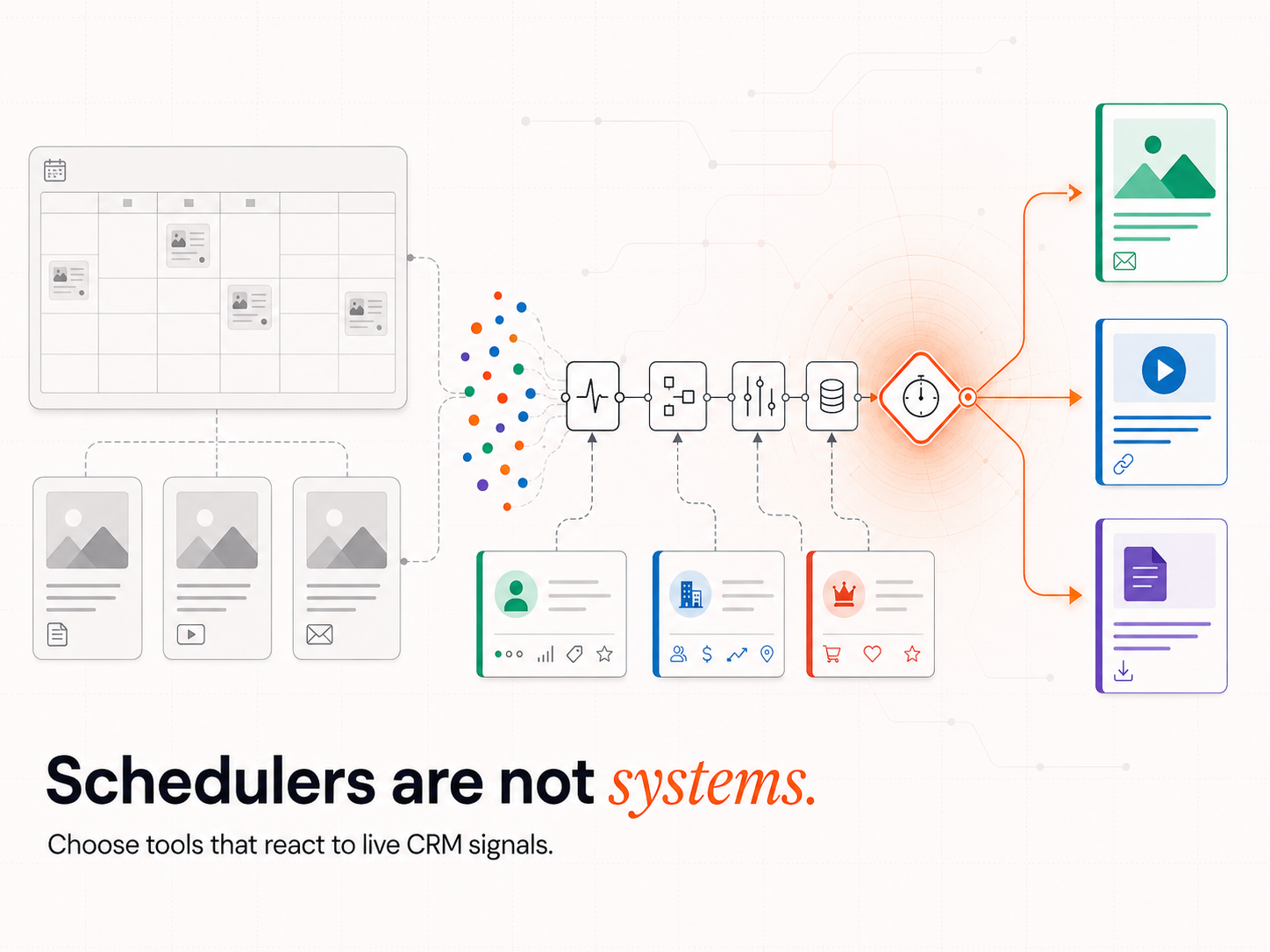
Most marketing automation tools fail the first test: they cannot respond to a CRM field change. They fire on a schedule, not a signal. 3 criteria separate the tools that convert from the tools that publish.
Signal Compatibility
A signal-compatible tool responds to:
- CRM field updates (lifecycle stage change, lead score threshold, custom field write)
- Webhook events from enrichment tools such as Clay
- Reply behaviour and engagement signals from outreach tools such as SmartLead
- External trigger events: funding rounds, job title changes, technology stack installs
A tool that cannot receive a webhook payload and execute a conditional action on it is not signal-compatible. It is a scheduler with a modern interface.
Workflow Flexibility
A workflow-flexible tool supports:
- Multi-branch logic at the field level (if/else based on industry, signal type, or lifecycle stage)
- Retry logic for failed sends or incomplete enrichment runs
- Conditional content selection (different templates for different signal categories)
- Delay management based on signal recency, not calendar position
System Connectivity
A system-connected tool must:
- Expose APIs and webhook endpoints without requiring developer access on each run
- Synchronise bidirectionally with HubSpot or Salesforce
- Accept token-based personalisation from CRM fields at the point of send
- Pass reply and engagement data back to the CRM on each interaction
Webfx 2025 marketing automation statistics report found 77% of marketing automation users report higher conversion rates. The 23% who do not are almost certainly running schedulers they believe are signal-compatible tools. The feature list looked the same. The conversion architecture was not.
Which Tools Work in a Signal-Led GTM Stack?
5 tools form the core of a signal-led content automation stack: each tool occupies a distinct position in the data flow, and removing one without rebuilding the surrounding integration logic breaks the signal chain.
Clay: Signal Detection and Enrichment
Clay is the signal detection layer that drives signal-based lead generation in a correctly built stack. It monitors target accounts for signal events: job title changes, technographic data (records of which software tools a company has installed or removed), funding announcements, and LinkedIn activity. When a signal fires, Clay enriches the contact record with firmographic data, technographic data, and verified email addresses drawn from its enrichment waterfall (a sequence of data providers checked in priority order until the most accurate record is found), then passes the enriched record downstream.
Clay passes enriched data to n8n rather than writing to HubSpot directly, because n8n applies governance rules before anything reaches the CRM. Teams that connect Clay directly to HubSpot bypass the governance layer and introduce field overwrite risk from the first sync cycle.
n8n: Orchestration and Data Governance
n8n sits between Clay and HubSpot. Every data write passes through n8n before it reaches the CRM. n8n applies:
- Deduplication checks (incoming record matched against existing contacts on email, domain, and LinkedIn URL)
- Field authority rules (which source is authorised to write which CRM field)
- 90-day no-contact checks
- Trigger routing (which sequence fires for which signal type)
Without n8n in this position, Clay writes directly to HubSpot. Two tools writing to the same HubSpot field simultaneously produce a race condition. The last write wins. The record that reaches the rep is whichever tool synced most recently, not whichever tool held the most accurate data.
HubSpot: CRM and Lifecycle Trigger Engine
HubSpot governs lifecycle stage, deal owner, and sequence enrollment. It holds the source of truth for contact status. When n8n writes a confirmed signal event to the designated HubSpot field, HubSpot fires the corresponding workflow: assigning the account to the correct owner, updating lifecycle stage, and triggering the SmartLead sequence.
HubSpot's lifecycle-stage triggers fire sequences without manual intervention, because every incoming write from n8n has passed validation before it arrives.
SmartLead: Outbound Sequence Execution
SmartLead executes the outbound sequences HubSpot triggers. It manages sending infrastructure, inbox warm-up (a process that gradually increases sending volume to establish sender reputation before high-volume sequences begin), deliverability routing, and reply detection. When a prospect replies, SmartLead passes the reply signal back to HubSpot, updating the contact record and halting any active sequences on that account.
Connecting SmartLead to a raw contact list without enriched CRM data defaults it to volume-based outreach. The signal routing logic that produces the performance differential lives in the architecture that governs what SmartLead receives, not in SmartLead itself.
AI Content Layer: Writer.com or Jasper
The AI content layer generates drafts that CRM-triggered sequences use. Custom tone models maintain brand consistency at scale. API integrations allow HubSpot or n8n to pull content templates dynamically based on signal type, industry, or account size. A funding signal routes to a revenue infrastructure sequence. A technology stack changes routes to a technical evaluation sequence. The signal determines which content fires. A calendar determines nothing about buyer intent.
52% of marketing professionals use AI tools for text generation, making it the highest adoption rate of any AI application in marketing, according to SQ Magazine's 2025 AI in marketing statistics report. The teams generating measurable returns from AI content tools are those routing AI output through CRM-triggered delivery, not publishing it on a calendar. The teams that are not generating those returns have the same tools configured in the wrong order.
What Does a Modular Workflow Architecture Look Like?
The difference between a stack that compounds in accuracy and one that compounds in repair costs is whether n8n sits between every data source and HubSpot. When it does, every write passes governance before it reaches the CRM. When it does not, every tool writes independently and the last sync wins.
Clay pushes enriched records to n8n then it applies deduplication, field authority checks, and trigger routing. Validated records are written to HubSpot and then fires sequences in SmartLead. SmartLead routes replies back to HubSpot. Each tool connects to n8n and not directly to each other.
The alternative is direct connections, when 2 tools fire simultaneously and write to the same HubSpot field, the last write wins. The record that reaches the rep is whichever tool synced most recently, not whichever tool held the most accurate data. Direct connections are simple to configure and produce compounding data quality problems over time.
The Modular Architecture in Practice
The architecture supports:
- Webhook triggers from any Clay signal event: A job change at a monitored account fires a webhook to n8n, which evaluates the record against governance rules before writing anything to HubSpot.
- Multi-branch workflow logic: Different signal types route to different sequences. A funding event routes to a revenue team sequence. A technology stack changes routes to a technical stakeholder sequence.
- API-queryable content libraries: The AI content layer returns the correct template based on signal type, industry, and lifecycle stage, not based on which sequence is next in a fixed queue.
- CRM synchronisation on confirmed writes only: HubSpot receives updates when n8n has validated the record, not on every sync cycle from every connected tool.
- Personalisation tokens from CRM fields at the point of send: SmartLead pulls the fields n8n confirmed as accurate, not the fields whichever tool synced last.
Automated campaigns perform better when they are triggered by behaviour, not fixed calendar dates. Omnisend’s 2026 email marketing benchmarks found that automated emails achieved a 30.21% open rate and 4.66% click-through rate, outperforming standard campaign sends because they reach subscribers at specific moments of intent.
How Do You Choose Tools That Support GTM System Design?
Evaluate tools by their position in the signal chain, not by their feature list in isolation. The question is not "does this tool have automation features?" but "can this tool receive a signal from n8n and act on it without a manual trigger?" Tools that cannot answer yes are schedulers. The signal-based marketing tools that generate pipeline are the ones where every component both receives and emits signal data to its adjacent tools.
Integration Failures Are Architecture Failures
The most common cause of content automation stack underperformance is connecting tools before defining the governance rules. When enrichment data flows from multiple sources without conflict resolution logic, tools write to the same CRM fields and silently overwrite each other on every sync cycle. The data degrades. The pipeline view becomes unreliable. Forecasts built on that data carry compounding uncertainty.
4 Governance Decisions to Make Before Any Tool Connects to the Production CRM
- Source of truth: Which tool is authorised to write each CRM field?
- Trigger governance: Which tool is authorised to fire each workflow type?
- Deduplication logic: Does an incoming record check for an existing match before writing?
- Rollback plan: If the integration produces data corruption in the first 72 hours, which fields revert, to which state, from which backup?
Teams that define these 4 decisions before connecting tools build stacks that compound in accuracy. Cropink’s 2026 marketing automation statistics, citing Nucleus Research, reports that businesses generate $5.44 for every $1 invested in marketing automation over three years. How much of that return accrues depends on integration architecture: specifically whether the stack produces qualifying pipeline or data triage.
How Does Intelligent Resourcing Architect a Signal-Led Content Automation System?
Intelligent Resourcing builds signal-led revenue systems for B2B GTM teams using Clay, n8n, HubSpot, and SmartLead as a connected stack. The architecture places n8n between every data source and HubSpot, governing all writes before they reach the CRM. Clients own the full system on completion.
The build follows this sequence:
- Source of truth definition across all active data sources
- Field authority map covering every CRM field the stack writes to
- Deduplication logic configured at the n8n layer before any write reaches HubSpot
- Trigger governance rules covering all Clay signal events, enrichment completions, and outreach replies
- Validation monitoring configured before go-live
When Clay detects a VP of Revenue appointment at a monitored account, n8n receives the enriched record, runs the deduplication check, confirms the 90-day no-contact rule, writes the signal to the designated HubSpot field, routes the account to the correct owner, and triggers the SmartLead sequence, all before a rep has opened a dashboard.
When Clay confirms a Verified Buying Window for a monitored account, the system routes and fires without human intervention. SmartLead selects content based on signal type, industry, and lifecycle stage, not from a generic sequence built months before the signal fires.
The result is an Evergreen CRM: a contact database that stays accurate because the architecture updates it continuously, not because a team audits it quarterly.
Teams building this stack can review the full governance requirements in the Clay, HubSpot, and Salesforce sync and field mapping guide and the detailed breakdown of how HubSpot and n8n work together to process signal events at scale.
The Cost of Running on a Calendar
Teams running calendar-based automation are not just missing a future opportunity. They are accepting weaker timing on every send. Omnisend’s 2026 benchmark shows the commercial difference behaviour-triggered timing can make: automated emails generated 22x more revenue per email than standard campaign sends.A scheduled email reaches an account when the calendar says so. That difference is not a feature gap but an architectural decision. It is already made by default the moment tools are connected without a defined signal chain.
The build that adds the signal layer takes 4 to 6 weeks. The cost of running on a calendar instead compounds every quarter. See how IR's lead generation system builds the Clay-to-HubSpot signal layer on your stack.
Content Creation
Tools only compound in accuracy when they are wired in the right order. The Revenue Operations Studio at Intelligent Resourcing architects the Clay, n8n, HubSpot, and SmartLead stack with the governance that keeps an Evergreen CRM accurate.
FAQs
What Is the Difference Between Content Automation and Content Scheduling?
Scheduling publishes content at preset times while automation sends content when a defined condition is met in the CRM: a lifecycle stage change, a lead score threshold, or a signal event confirmed by an enrichment tool. Signal-based automation produces higher conversion rates because the content arrives when intent is confirmed.
How Do Clay and HubSpot Work Together in a Signal-Led Stack?
Clay detects signal events from external sources (job changes, funding announcements, technology stack installs) and enriches the contact record with firmographic and technographic data. The enriched record passes to n8n, which applies deduplication and field authority checks. Confirmed records are written to the designated HubSpot fields, which trigger lifecycle stage updates and outreach sequences. Clay does not write to HubSpot directly in a correctly architected stack. All writes go through n8n first, because direct Clay-to-HubSpot connections bypass the governance layer that prevents field overwrites.
Can AI Tools Replace Human Editors in Automated Content Systems?
AI tools generate first drafts and apply tone models at scale. Human QA remains necessary for brand-sensitive and compliance-heavy content. AI handles volume while humans handle the edge cases where brand or regulatory risk is high.
What Is the Best Way to Test a Content Automation Workflow Before Scaling?
Start with 1 trigger (a CRM field update), route it through the full stack, and simulate lead activity using test contact records. Verify that deduplication logic catches incoming duplicates, that field authority rules prevent unauthorised writes, and that trigger governance blocks duplicate sequence enrolments. Use preview modes in n8n and HubSpot before connecting to the production CRM. Validate against production-equivalent records before scaling to the full target account list.
Are No-Code Platforms Like n8n Viable for Mid-Sized GTM Teams?
Yes. n8n supports 400+ app integrations and handles conditional logic, webhook listening, and multi-step trigger sequences without requiring a developer on every workflow build. A GTM engineer builds and maintains the orchestration layer. This is not a task for a general marketer: it requires understanding conditional logic, API connections, and field authority rules.
What Is a Verified Buying Window and How Does It Trigger Content?
A Verified Buying Window is the point at which a specific combination of signals confirms that a target account has entered an active purchase consideration period. Signal examples: a VP of Revenue joins the account (job change signal), the account adds a competing technology to its stack (technographic signal), and the company posts a demand generation role (hiring signal). When Clay confirms all 3 signals within a defined window, n8n routes the account and fires the corresponding SmartLead sequence. The content is selected based on signal type, not on the position in a generic calendar queue.