
What is signal-based email marketing automation?
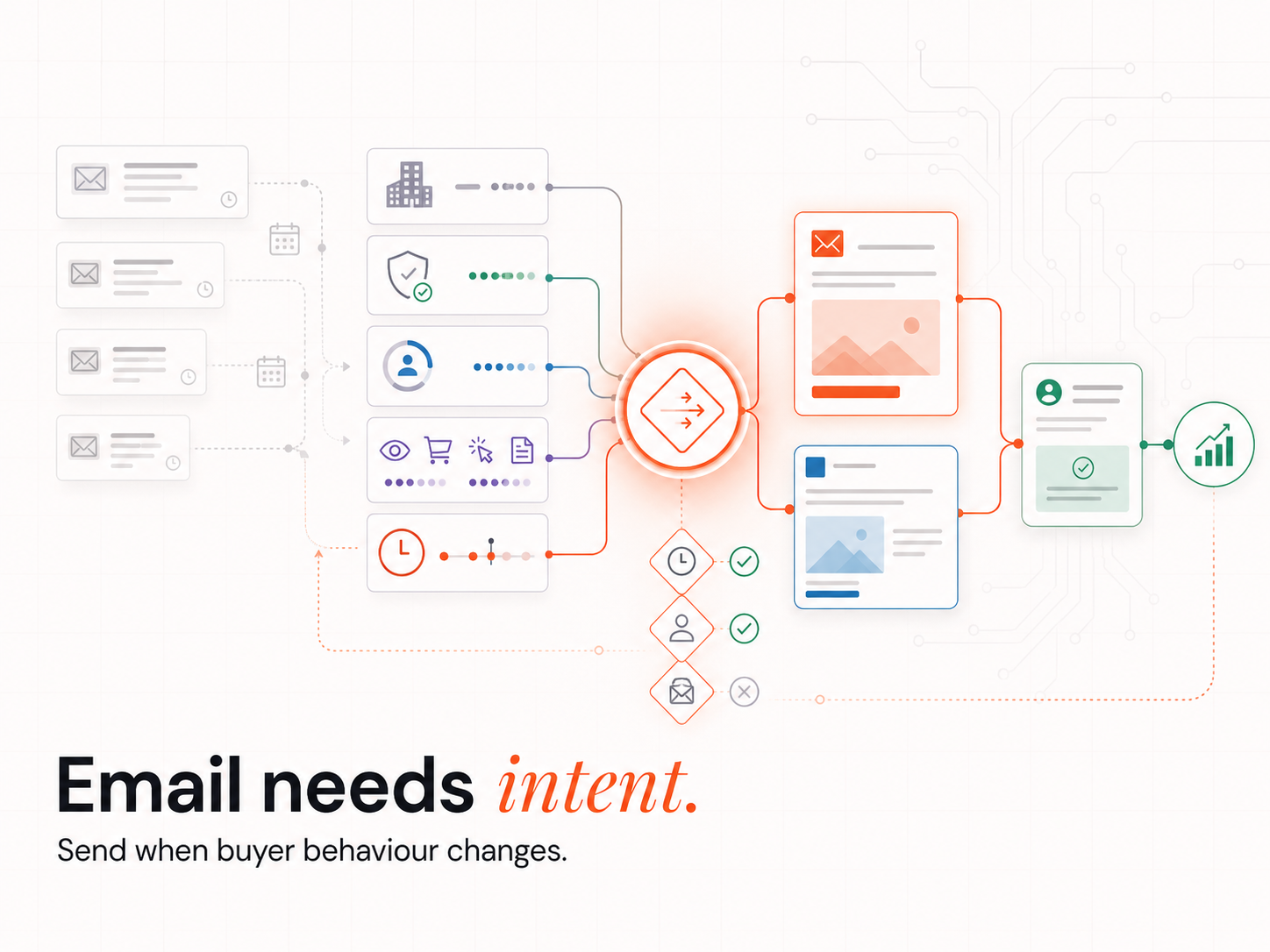
Signal-based email marketing automation sends the next email based on what a contact actually does (or what changes in their environment), not based on how many days have passed since the last touch. The system captures signals (page visits, content downloads, abandoned carts, job changes, funding events, tech-stack changes), scores them, and triggers the right message the moment intent appears. Scheduled drip campaigns send the same sequence to everyone on a fixed interval; signal-based replaces the calendar with the buyer's behaviour.
Why does signal-based automation outperform scheduled drip campaigns?
Because behaviour is a stronger predictor of next-action than time. Litmus's State of Email research puts automated emails at $2.87 per send versus $0.18 for broadcast campaigns, roughly a 16x revenue gap, because automated messages reach the contact when they are most receptive. Scheduled drips treat every contact the same on day three regardless of whether they opened day one. Signal-based treats them differently because they behaved differently.
Personalisation is now table stakes, not a differentiator. Twilio Segment's State of Personalization found 62% of consumers will lose loyalty to a brand whose experience is not personalised. A drip campaign that ignores last week's product-page visit reads as a brand that is not paying attention, which means engagement decays even if open rates look healthy on the surface.
What buyer signals actually trigger conversion in email?
The signals that move pipeline are the ones that prove intent in the buyer's current window, not generic engagement scores.
- Behavioural: product or pricing page visits, abandoned carts, demo requests, content downloads, repeat visits in a short period.
- Lifecycle: trial start, trial expiry, subscription renewal date, post-purchase milestones.
- Firmographic and intent: job changes (new buyer in seat), funding rounds, tech-stack changes, hiring spikes in target functions, third-party intent surges.
- CRM-state: lead score thresholds, account routing changes, sales-stage progression or stall.
For B2B specifically, RollWorks and Bombora's joint research found intent-informed accounts generate 40 to 70% more pipeline than control accounts in the same period. Pairing on-domain behaviour with third-party intent data multiplies the lift, because you catch buyers researching elsewhere before they ever land on your site.
How do you build intent-triggered email sequences with Clay and HubSpot?
You wire signal capture, scoring, and email triggering into one flow:
- Capture signals at the source. Track on-site behaviour through your analytics or HubSpot tracking script. Pull third-party intent data through Bombora or similar. Capture firmographic and job-change signals through Clay enrichment running on your CRM list.
- Score and threshold. Apply real-time lead scoring on the combined signal stream so the system knows which signals matter and at what intensity. Define the threshold that fires an email versus the threshold that alerts a rep.
- Trigger from the orchestration layer. Use the Clay-to-HubSpot Evergreen CRM integration so enriched data lands in the CRM cleanly and Workflows in HubSpot fire on the signal field rather than on a list membership change alone.
- Branch by signal type. Pricing-page visit triggers a value-prop email and an SDR alert. Abandoned cart triggers a reminder with the specific item. Job change triggers a "new role" reach-out from a named team member.
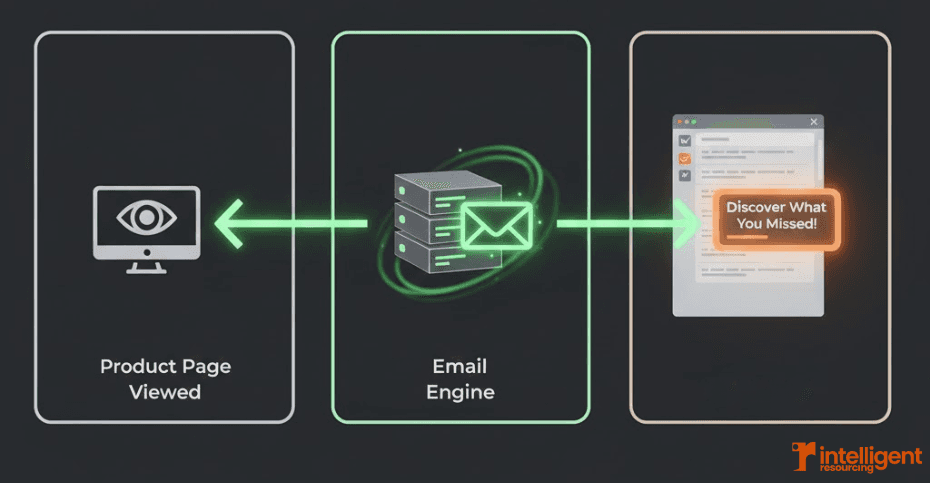
The signal-based architecture below shows the flow at its simplest: a page view triggers the email engine, which routes the contextual message back to the contact's inbox in real time.
How does CRM data feed dynamic email personalisation?
CRM data is what turns a generic trigger into a specific message. The lifecycle stage, recent purchases, sales-conversation history, custom fields, and account-level firmographics in the CRM are pulled into the email template at send time, so the same trigger generates a different message for an enterprise CFO than for a startup founder. Specifically:
- Pre-purchase: dynamic offers based on browsing behaviour, with the exact product they viewed.
- Post-purchase: retention sequences keyed to the product purchased and the date.
- B2B lifecycle: content tuned to sales stage (top-of-funnel education for early stage, ROI calculators and case studies for late stage).
- Role-based: different subject lines and value props for the same content depending on the recipient's job title.
The cleaner the CRM data, the sharper the personalisation. An Evergreen CRM (continuous hygiene running in the workflow, not as a quarterly cleanup) keeps the inputs current so the personalisation does not decay between triggers.
When should you still use scheduled drip campaigns?
When the sequence is the value and the timing is the schedule, drip wins. Onboarding programmes (a 5-email lesson series, a 10-day getting-started course) are designed to be paced, so a scheduled cadence is the right model. Brand-new lists with no signal capture infrastructure should run scheduled drips first to build engagement data, which then feeds the signal layer when it goes live. A single high-value content series (a quarterly research report, a launch sequence) does not need signal triggering; calendar-driven delivery is the point.
Klaviyo's 2024 abandoned-cart benchmarks put open rates at 50.5%, the highest of any flow type, which makes abandoned cart the textbook case for replacing drip with signal. Onboarding does not have that pattern; the value is in the content order, not the timing.
How do you wire signals, CRM, and email together as one engine?
Treat the three as layers of one system, not three separate tools:
- Signal layer: Clay (enrichment, intent, job-change, tech-stack), plus on-domain behaviour from your CMS or HubSpot tracking, plus third-party intent from Bombora.
- CRM layer: HubSpot or Salesforce as the system of record, holding lifecycle state, account history, and the verified contact graph.
- Email layer: HubSpot Workflows, Marketo, or a transactional sender, triggered by CRM field changes that the signal layer writes in.
The orchestration sits between them. n8n or Clay-as-orchestrator routes signals into CRM updates, fires workflow triggers, and feeds Signal Response Protocols that escalate high-intent signals to a rep within minutes. The full stack is what makes a signal-based marketing motion compound rather than decay over time.
Content Creation
The Revenue Operations Studio at Intelligent Resourcing wires Clay enrichment, CRM lifecycle data, and the email orchestration layer around the Verified Buying Window, so your emails fire on real intent and your team owns the engine after the build.
FAQs
What are signal-based email marketing workflows?
Workflows that send the next email based on a buyer signal (a behaviour, lifecycle change, or intent event) rather than on a fixed time interval. The trigger is the contact's action or change in their environment, not the calendar.
How do I use buyer signals to personalise email marketing?
Capture signals through Clay enrichment, on-site tracking, and CRM lifecycle updates. Score them. Route the strongest signals to email workflows that pull dynamic content from CRM data, so each message reflects the contact's actual situation, not a generic segment.
What is the role of CRM data in email personalisation?
CRM data turns a trigger into a specific message. The contact's lifecycle stage, recent purchases, job role, and account history feed the email template at send time, so the same signal produces a different email for a CFO than for a founder.
Can I run scheduled drip campaigns and signal-based automation together?
Yes, and most B2B teams should. Use scheduled drips for fixed-content onboarding and brand-new lists; layer signal-triggered sequences on top for abandoned cart, intent surges, and lifecycle re-engagement. Hybrid is the realistic 2026 motion.
What is the difference between intent data and behavioural signals?
Behavioural signals are actions a contact takes on your own properties (page visits, downloads, demo requests). Intent data is what they are researching elsewhere (third-party content consumption picked up by providers like Bombora). Combining both gives the most complete read on buying timing.
How do I get started without a full signal-based stack?
Start with one or two high-leverage signals (abandoned cart, pricing-page visit) wired into your existing CRM and email tool. Prove the lift on a small set of accounts, then expand to additional signals as the data layer matures.