
If you have built a complex n8n workflow with AI nodes and external API calls, you have hit a wall with execution limits or bloated outputs. This article walks through the dummy node pattern, a lightweight engineering fix that strips unnecessary payload data between nodes and turns a brittle workflow into a reliable production system.
The Problem With Complex AI-Driven Workflows
When too much data becomes too much
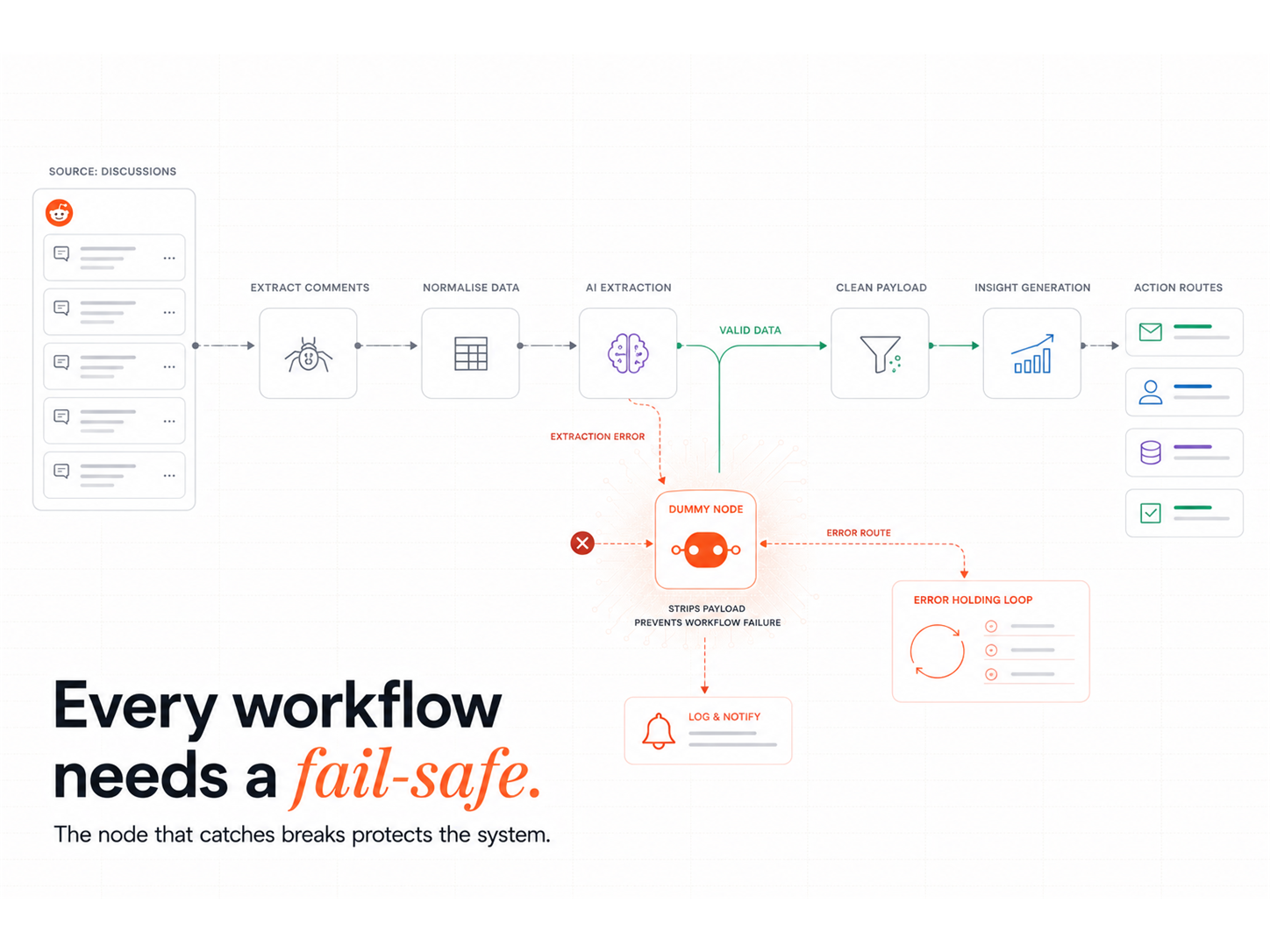
Our Reddit scraper retrieves thousands of posts and comments per run, funnelled through GPT for classification and summarisation. In our testing, the AI outputs were bloated: JSON objects with hundreds of fields, nested arrays, and verbose completions. In n8n, every node passes data to the next, so an untrimmed payload from the AI step travels through every downstream node.
Generative AI projects on GitHub grew 98% year-over-year in 2024, with 137,000 public projects now active, according to GitHub's Octoverse 2024 report. Every one of those projects produces AI outputs that downstream workflows have to process, route, or filter. The dummy node pattern is the engineering hygiene that keeps payload bloat under control.
How System Overload Shows Up
The cracks showed up in four ways:
- Workflows began timing out unpredictably
- Logs were flooded with unnecessary JSON
- Debugging became a nightmare due to massive execution histories
- Cloud-hosted workflows hit memory caps and stopped mid-loop
Each Cloudflare Workers isolate is capped at 128 MB of memory, including the JavaScript heap and any WebAssembly allocations, per Cloudflare Workers' platform limits documentation. A bloated AI payload travelling through multiple nodes hits that ceiling fast. AWS Lambda functions can be allocated 128 MB to 10,240 MB of memory in 1 MB increments per AWS Lambda's quota documentation, but bigger functions cost more per invocation, which is why payload trimming inside the workflow matters more than provisioning more memory at the function level.
This was not just inconvenient. It made our automation brittle and unscalable, because every downstream node had to process the bloated payload from the AI step.
Why Reddit scrapers are especially prone to bloated outputs
Reddit's API returns rich metadata: titles, bodies, comments, scores, flairs, awards, and timestamps. Every post object is already a chunky payload. AI calls layered on top return lengthy completions or nested objects, multiplying the size of each item travelling through the flow. For a Reddit scraper used as a buyer-signal capture system feeding a Signal Response Protocol, the bloat compounds with every enrichment step until the workflow falls over.
What is a dummy node in workflow automation?
A dummy node is a no-op step in a workflow that returns a static or minimal response. In n8n, you build it as a Set node with empty fields, or a Function node that returns a hard-coded value. The purpose is to intentionally interrupt or isolate data flow between nodes, stripping unnecessary payload at a defined boundary.
Why we added it to our Reddit scraper
After weeks of patching memory errors and timeout retries, we realised the loops and conditional paths in our scraper carried bulky AI-node outputs that were not needed downstream. We inserted a dummy node right after key branching logic. The downstream nodes received a clean slate and ran in a fraction of the time.
How it works: static return, dynamic impact
The dummy node returns something like this:
[
{
"clean": true
}
]
That single object replaces whatever payload the previous node produced. Downstream nodes receive only "clean: true" plus any data the dummy node explicitly forwards. The result:
- Lighter memory use, because each downstream node processes a 50-byte payload instead of a 50 KB one
- No carry-over of unnecessary GPT or Reddit API data
- Clearer logs, because each execution shows only the data the workflow actually needs
- More predictable workflow performance, because every iteration starts from the same payload size
The Results: Small Fix, Big Stability Gains
Reduced memory footprint
In our internal testing on the Reddit scraper workflow, inserting the dummy node produced a 40% decrease in memory usage per execution. The same scraper that previously hit the 128 MB Cloudflare Workers ceiling now ran with headroom. Each iteration started from a clean payload, so memory pressure no longer compounded across loop runs.
Faster execution and fewer timeouts
In our cloud-hosted version, execution time dropped from over 2 minutes per run to under 45 seconds in some cases. Timeout errors reduced by 90%. The dummy node was the single change that delivered the lift, because it stopped downstream nodes from re-processing the same bloated AI payload at every step.
Easier debugging and maintenance
Smaller logs meant we read them in seconds, not minutes. Failed paths surfaced faster, because the execution history showed only the data that mattered at each step. Retries dropped to near zero, because most of the original errors were caused by bloated-data overflow.
The dummy node also cleaned up isolation testing. We verified a single branch worked end-to-end without the noise of upstream payloads.
Why Every Workflow Should Consider a Dummy Node
Situations where a dummy node helps
The dummy node earns its keep in four scenarios:
- After AI tools (GPT, Claude, Gemini) that return large outputs
- Post-conditional branches, where one path does not require full upstream data
- Before webhooks, to avoid unnecessary response size
- Inside loops, where only the loop state matters
Automated B2B lead generation with Clay and n8n is one of the most common production workflows where dummy nodes earn their keep, because the enrichment cycle generates the largest single-step payload in the system.
Controlling logic vs. adding complexity
Some argue that introducing "do nothing" nodes adds clutter to a workflow. The opposite is true. Dummy nodes offer clarity by defining clear boundaries between processing stages, like comments in code: not required for execution, but invaluable for the engineer who has to debug it six months later.
The minimalist mindset for better automation
Lean automations outperform feature-stacked ones. Every additional field, transformation, or carry-over increases the surface area for failure. The dummy node forces the engineer to ask one question: what does the next node actually need? If the answer is less than what the upstream node produced, the dummy node strips the rest.
Applying This Fix in Your Own Workflows
Using dummy nodes in n8n and other platforms
In n8n, the recipe is straightforward:
- Insert a Set node
- Uncheck all input fields
- Add a single output field like { "pass": true }
For a Function node:
return [
{ json: { reset: true } }
];
The same pattern works in Zapier (using a Code by Zapier step) and in Make / Integromat (using a Data Store or Tools module). HubSpot and n8n work together when each n8n branch returns a clean payload to HubSpot, which is the same hygiene principle the dummy node enforces.
76% of developers are using or planning to use AI tools in their development workflow this year, up from 70% in 2023, according to Stack Overflow's 2024 Developer Survey. Workflow automation now sits inside an AI loop for most teams, which is why output discipline at the node level matters more than ever.
Example scenarios: webhooks, loops, and external APIs
- Webhook sanitisation: before sending a final response, clear previous outputs
- Loop resets: use dummy nodes to refresh data inside iterations
- Post-AI filtering: break chains after language models to avoid output floods
Clay and n8n API workflows for GTM enrichment hit the same payload-bloat problem when Clay returns a 50-field record and downstream nodes only need 5 fields.
Common pitfalls to avoid
- Do not overuse dummy nodes; place them only where output trimming is beneficial
- Ensure essential data fields are present after the dummy node strips the payload.
- Test downstream nodes to verify they still function with the minimal payload
Final Thoughts: Sometimes Doing Nothing Does Everything
The dummy node fixed our Reddit scraper because it solved the cause, not the symptoms: too much data, travelling too far downstream. The fix is one node and three lines of code.
If your n8n workflow is slow, flaky, or hard to debug, the dummy node pattern is the first thing to try. The best optimisation is subtraction, not addition. This is the kind of unglamorous engineering hygiene that makes a Revenue Operations Studio install reliable in production, because reliability at the node level is what separates a demo workflow from a system the business can run on.
What is a dummy node in workflow automation?
A dummy node is a placeholder step that returns minimal or static data. It controls output by breaking the unnecessary flow of upstream payloads into downstream nodes, which is why it reduces memory use and improves performance.
How does a dummy node prevent data overload?
It returns a clean payload to stop large GPT or API outputs travelling through every downstream node. The downstream nodes then process a small, predictable input rather than a bloated one, which is why workflows run faster and timeout errors drop.
Can I use dummy nodes in platforms other than n8n?
Yes. The dummy node is a pattern, not a feature. It works in Zapier (via Code by Zapier), Make / Integromat (via Data Store or Tools), and any custom workflow engine that allows you to insert a transformation step.
When should I not use a dummy node?
When the data downstream actually needs the full upstream payload. Overusing dummy nodes drops essential context and produces silently broken logic, which is harder to debug than a bloated payload.
What are other lightweight fixes for bloated workflows?
Conditional filters block unnecessary execution paths before bloated data reaches downstream nodes. Query parameters trim API responses at the source, so only the fields the workflow actually needs come through. For workflows that have grown too complex to manage as a single flow, splitting them into smaller sub-workflows isolates each processing stage and makes both debugging and maintenance significantly faster.
Clay Workflows
The dummy node is one pattern in a larger engineering toolkit that keeps Revenue Operations Studio installs reliable. Intelligent Resourcing builds the engineering layer that keeps workflows running in production: Clay enrichment, HubSpot routing, SmartLead outbound, and n8n orchestration.