
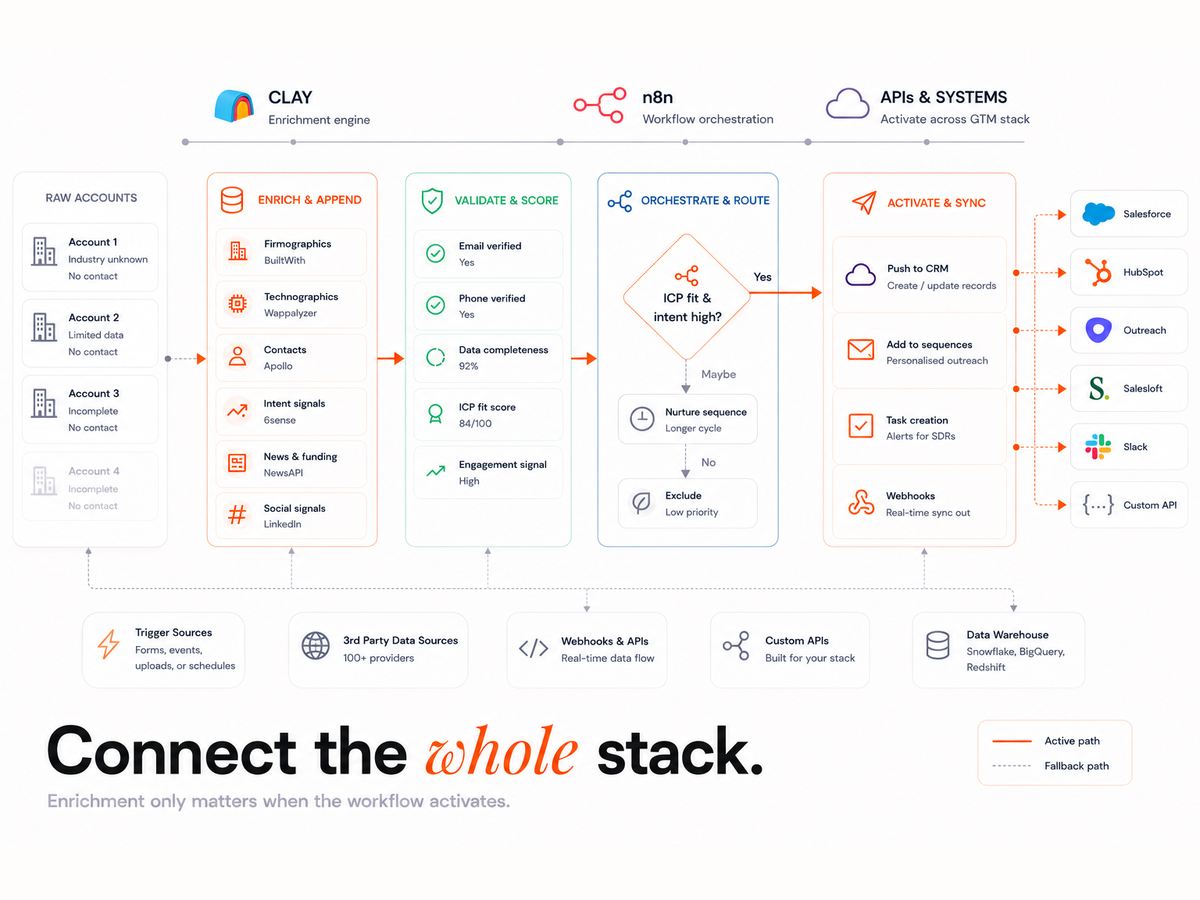
Manual GTM workflows cost teams time, accuracy, and scale. Whether you're trying to enrich new leads or sync them across platforms, too many businesses still rely on patchy spreadsheets or brittle integrations. But what if you could automate the entire pipeline,from lead capture to outreach,without compromising data quality?
With Clay and n8n working together, RevOps and GTM teams can design self-healing, API-driven workflows that enrich, route, and act on lead data in real time. This guide explains how to harness the Clay n8n API connection to automate your GTM processes at scale,without losing visibility or control.
Why Clay and n8n Work Together
Clay = Enrichment and Data Accuracy
Clay is built for data enrichment, validation, and scoring. It connects to dozens of public and proprietary data sources to verify emails, identify job titles, surface LinkedIn profiles, and much more. This gives your CRM high-quality data from the start, reducing bounce rates and improving segmentation downstream.
Using Clay ensures the decision logic of your lead workflow is based on clean, deduplicated data. For example, you can set thresholds to reject leads missing a verified company domain or enrich with company size before routing to sales.
n8n = Orchestration and Delivery Reliability
n8n (pronounced "n-eight-n") is the orchestration layer that handles your workflow triggers, API calls, retries, and error handling. While Clay focuses on data quality, n8n ensures that data gets where it needs to go reliably,across CRMs, email platforms, and internal tools like Slack.
It supports queues, detailed logging, conditional paths, and rate-limiting features. This makes it perfect for complex GTM pipelines where you can't afford to drop a lead due to a failed sync or an API rate limit.
Clay n8n API = Bridge Between the Two Layers
The Clay n8n API connection allows you to embed Clay's powerful enrichment and logic directly into n8n workflows. It's a real-time bridge: n8n sends data to Clay, Clay processes it and returns cleaned, scored results, and n8n routes that output to the correct destination.
This setup creates closed-loop GTM automation, allowing you to move faster while keeping your CRM evergreen.
Each Platform's Role in GTM Automation
Clay: The Enrichment and Decision Layer
Clay shines when it comes to:
- Verified data: Ensure emails, phone numbers, and company info are accurate.
- Scoring and deduplication: Identify duplicates before syncing to your CRM.
- Decision logic: Route leads based on job title, industry, or domain match.
- Refresh monitoring: Recheck leads periodically to maintain data hygiene.
This makes it ideal for setting rules like, "Only sync leads from companies with over 50 employees and a verified work email." For this kind of high-precision routing, many teams rely on repeatable, tested enrichment logic,often using structured, modular approaches similar to the best Clay workflows already in use across leading GTM teams.
n8n: The Orchestration and Reliability Layer
Where Clay enriches, n8n delivers. It manages:
- Triggers and timing: Fire workflows on lead capture, webhook, or schedule.
- Retries and queues: Prevent API limits or failures from losing leads.
- API handling: Seamlessly connect HubSpot, Slack, Smartlead, Airtable, and more.
- Observability: Log every run, webhook, and failure for end-to-end visibility.
The real value of n8n is control. If a lead fails to sync due to a 429 error or invalid webhook, n8n can retry automatically or route it to a DLQ (dead letter queue).
How Clay + n8n Work Together
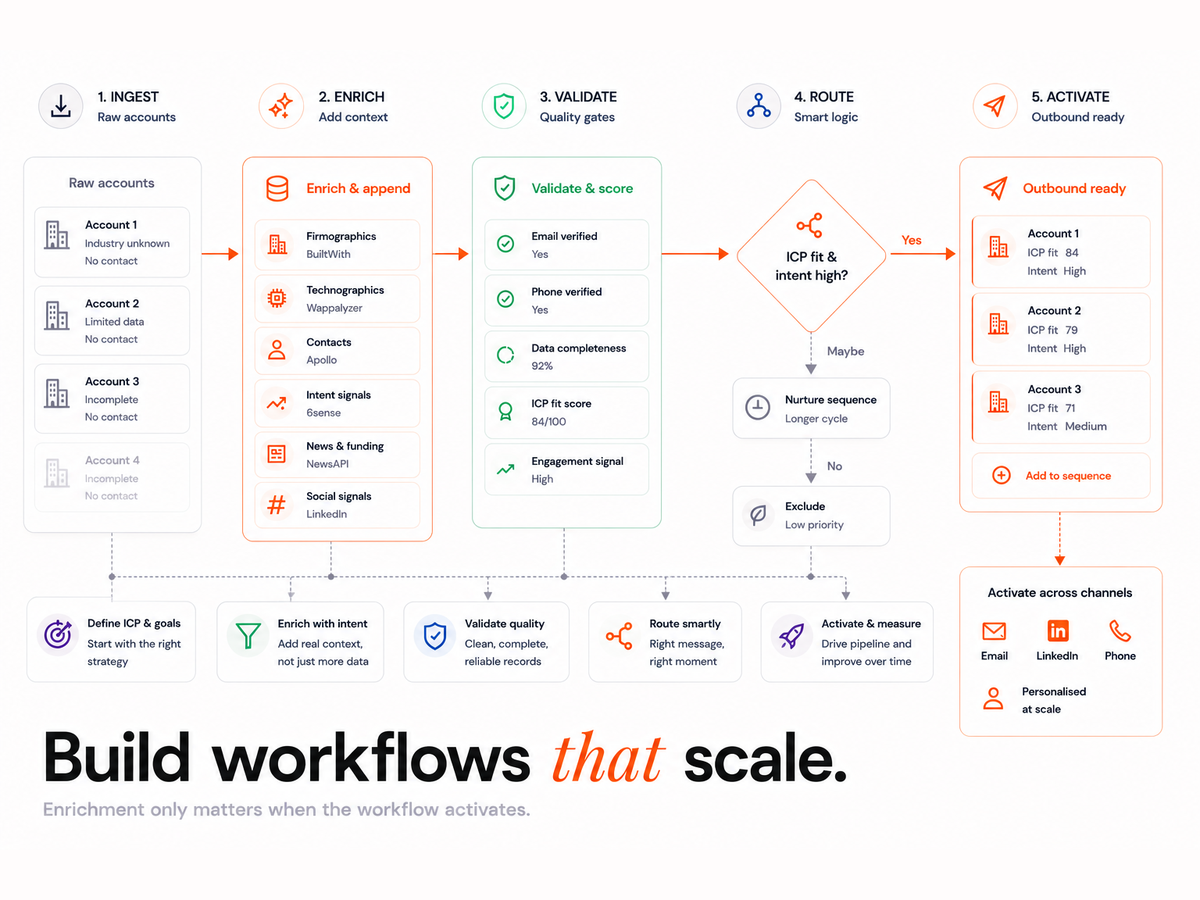
Here's how a complete Clay + n8n workflow functions:
- n8n triggers a Clay run via API or webhook when a lead is captured.
- Clay enriches and processes the lead, verifying, scoring, and tagging.
- n8n waits for Clay's output, then routes the result to your CRM, Smartlead, or email tool.
- n8n logs and monitors the process, retrying any failed steps and alerting you if something breaks.
This gives you complete control from capture to outreach, all without human input.
Example Workflow: From Enrichment to Outreach
| Stage | Clay Role | n8n Role |
|---|---|---|
| Lead Capture | Receive or sync leads | Trigger Clay enrichment via API or webhook |
| Enrichment | Verify, score, deduplicate | Wait for and parse Clay output |
| Routing | Tag for routing or assignment | Send to HubSpot, Smartlead, or Slack |
| QA and Retry | Output fill rates, duplicate flags | Retry failed jobs, log errors, maintain DLQs |
This closed-loop pattern creates a resilient, evergreen lead pipeline.
Proven Integration Patterns
1. Clay-Centric with n8n Assist
In this model, Clay owns enrichment and logic. n8n's job is to:
- Trigger Clay jobs on new leads.
- Retry failed attempts or timeouts.
- Deliver final data to the right system.
If your team is leaning into enrichment as the source of truth, it's worth understanding how Clay workflow automation helps centralise that logic and make your data decisions more scalable.
2. n8n-Centric with Clay Enrichment
n8n orchestrates everything,timing, retries, API syncs,but calls Clay in the middle of workflows for enrichment.
Great for users with multi-step flows where Clay is just one part of a larger journey.
3. Full-Loop Automation with the Clay n8n API
This is the most advanced model. n8n triggers Clay, waits for results, handles retries, routes final data, and logs every step.
Perfect for large-scale lead workflows with high volume and evergreen CRM goals.
For complex, self-healing setups, working with a Clay integration expert can help map dependencies, identify failure points, and build observability into every run.
Implementation Flow: From Pilot to Scale
- Define KPIs: Fill rate (≥90%), bounce rate (<2%), time-to-touch (<15 mins).
- Design enrichment logic in Clay: Add fields, scoring, deduplication.
- Build n8n flows: Trigger via webhook or poll, add retry logic and DLQs.
- Add observability: Track error nodes, webhook failures, and queue sizes.
- Pilot for 7 days: Validate metrics before scaling.
- Scale up: Add refresh cycles, QA dashboards, and sampling checkpoints.
Common Pitfalls (and How to Avoid Them)
Mistake 1: Running Logic in n8n
Fix: Keep all enrichment and data decisions inside Clay. Let n8n handle timing and delivery.
Mistake 2: No Sampling or QA
Fix: Set up dashboards to monitor fill rates, duplicate rates, and bounce trends weekly
Mistake 3: No Idempotency
Fix: Use unique job and lead identifiers. Prevent re-processing the same input twice.
Mistake 4: No Retry Logic
Fix: Always include retries and DLQs in n8n for every API call.
Mistake 5: No Observability
Fix: Log all Clay jobs, n8n runs, and webhook statuses. Track failure rates over time.
When to Use Each Setup
| Use Case | Recommended Setup |
|---|---|
| Simple stack, focus on data quality | Clay-only |
| Enrichment handled elsewhere | n8n-only |
| Evergreen CRM with high-volume workflows | Clay + n8n API integration |
Clay Workflows
Book a 30-minute workflow audit and get a free sampling plan, Clay + n8n integration map, and an Evergreen CRM policy. No meetings guarantee.