
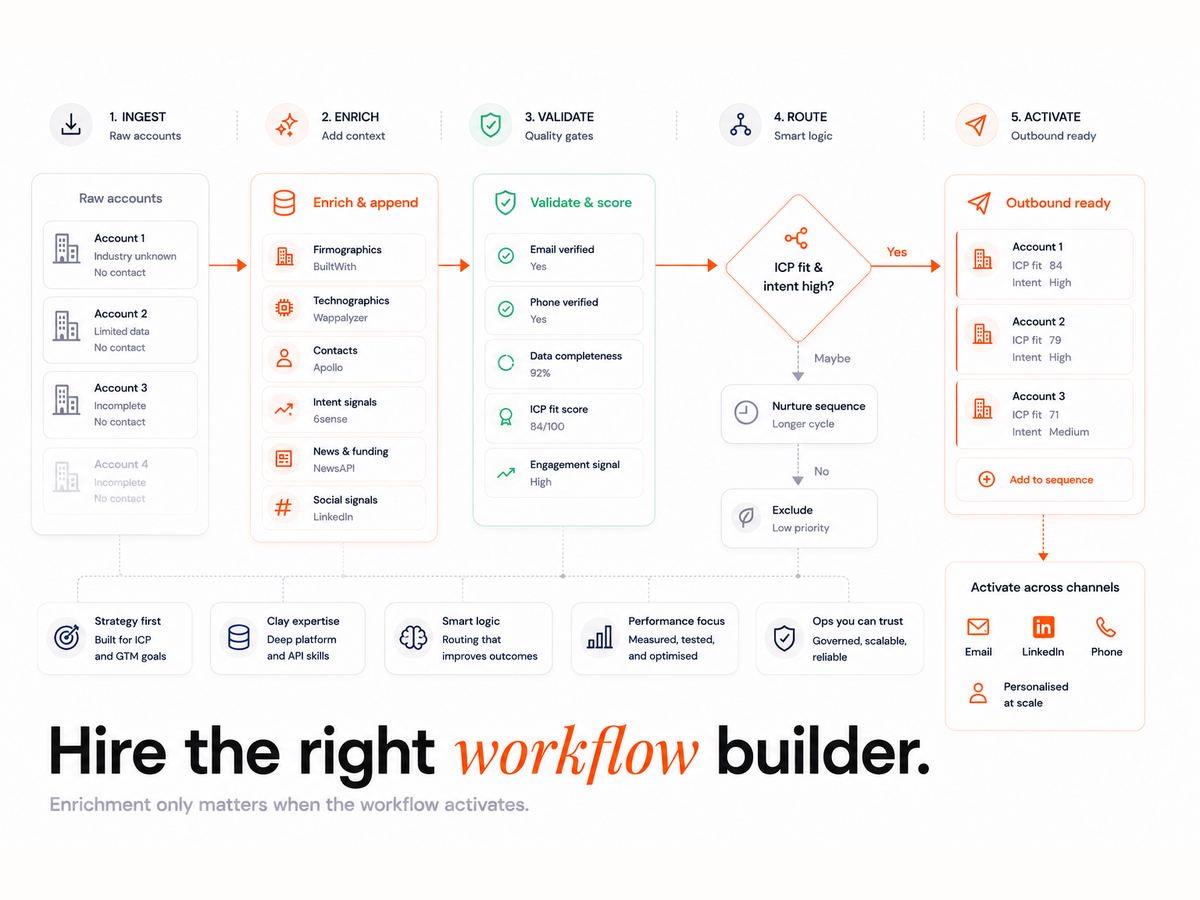
Most GTM teams waste valuable hours on manual lead research, only to feed incomplete data into a CRM that's already cluttered. Clay promises a powerful solution, yet hiring the wrong person to implement it, often a general RevOps consultant, can do more harm than good. What you really need is a dedicated Clay workflow expert who understands the nuances of enrichment, QA, and orchestration across your sales stack.
In this guide, you'll learn exactly what a Clay workflow expert builds, how to hire one, what results to expect in just seven days, and what it should realistically cost. Let's explore why specialists win over generalists, and how to get it right the first time.
Why You Need a Clay Workflow Expert (Not Just a RevOps Generalist)
Clay isn't your typical SaaS tool. It connects to hundreds of APIs, scores intent signals, enriches leads across multiple sources, and orchestrates logic that impacts CRM integrity in real time. Hiring someone who can "connect tools" is simply not enough.
A general RevOps consultant may understand integrations, but Clay demands fluency in:
- Enrichment hierarchies
- Data validation logic
- QA loops and deduplication workflows
- CRM routing tied to SLAs
These are not "plug-and-play" tasks. They require architectural thinking, constant iteration, and a mindset focused on long-term scalability.
If your GTM team is serious about replacing manual prospecting with an Evergreen CRM, you need more than connections. You need intelligent system design.
What a Clay Workflow Expert Actually Builds
A true Clay expert doesn't just "build automations." They craft intelligent systems designed to maximise lead quality, SDR efficiency, and data accuracy.
Here's what you can expect them to build, and more importantly, what that means for your team:
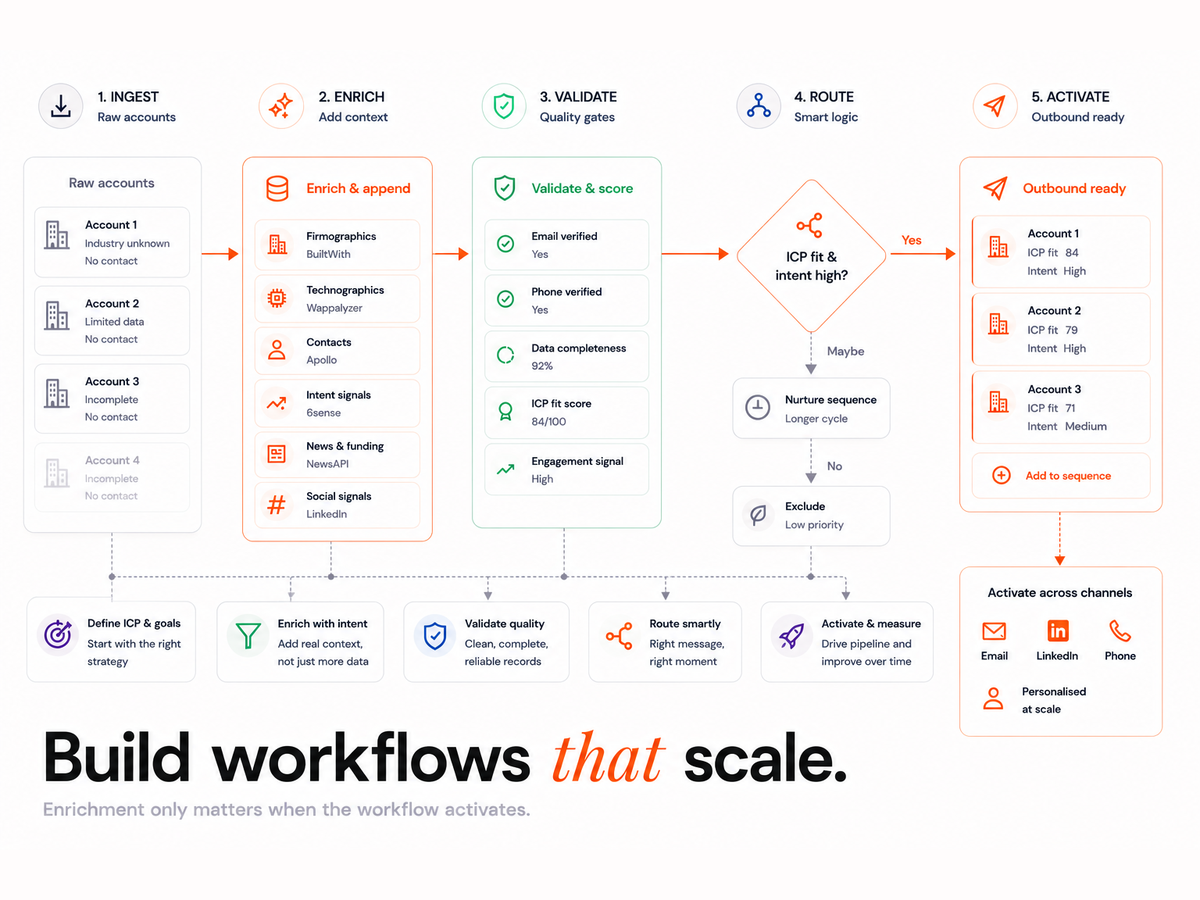
Multi-source enrichment → 90-95% profile completion
Pull from tools like Clearbit, Apollo, and LinkedIn simultaneously to enrich leads with full job titles, company data, and contact details.
Intent scoring
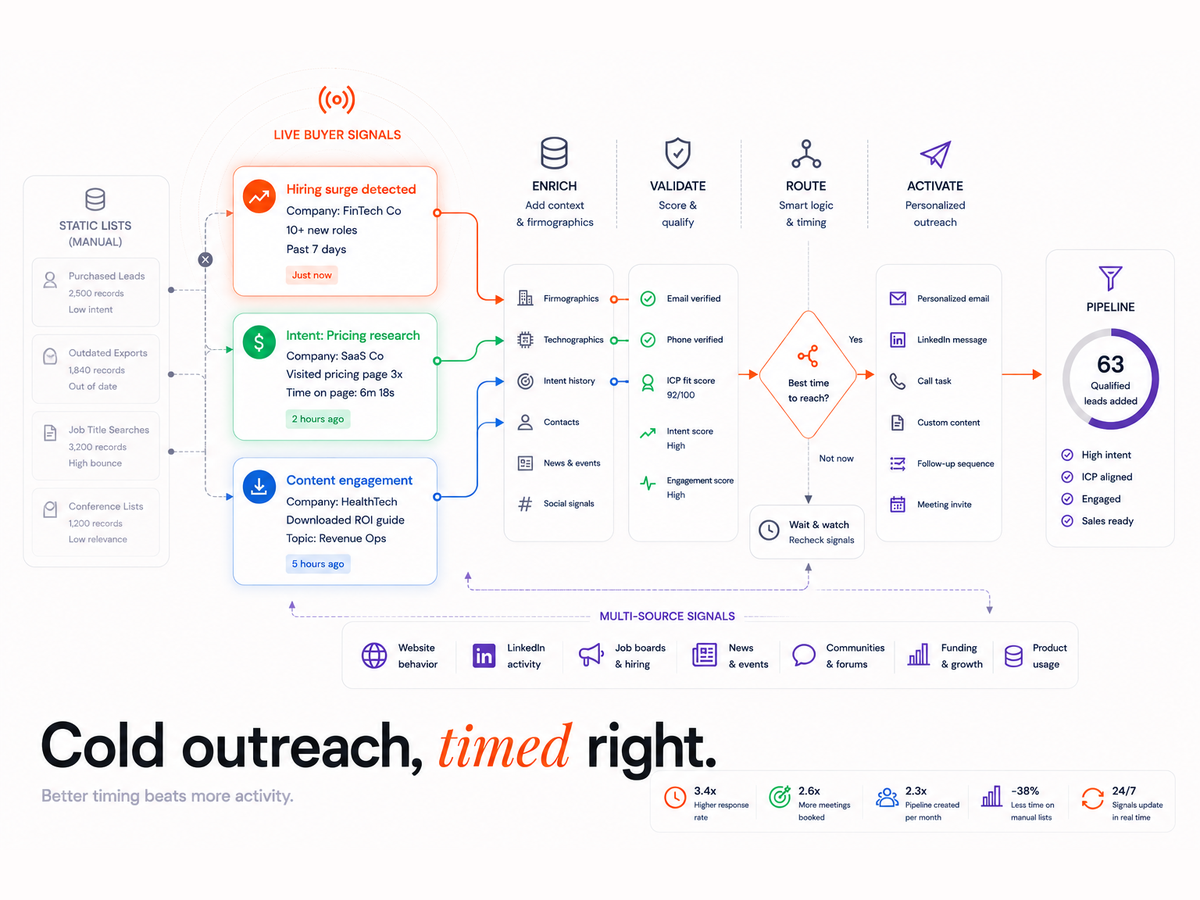
Assign weighted scores using behavioural signals, ideal for prioritising outreach based on job changes, firmographic data, or trigger events.
CRM routing + SLAs
Leads are automatically routed to the correct owner or segment, respecting service-level agreements and sales territories.
QA & dedupe loops
Workflows clean themselves through validation steps, bounce checks, and match-merge logic to remove duplicates and errors.
If you're exploring tools like Clay, it's worth understanding the broader methodology behind intelligent workflow design. Our article on how Clay specialists optimise enrichment layers explores how experts build logic trees, data validation steps, and QA loops to ensure data accuracy at scale.
How to Hire the Right Clay Workflow Expert (Step-by-Step)
Finding the right Clay expert doesn't need to be complicated, but it does need to be rigorous. Here's a proven four-step framework:
Step 1: Audit & Discovery
Start with a systems audit. Your expert should map your current enrichment flow, CRM logic, and team pain points. Look for deep questions, not generic assessments.
Step 2: Build & Orchestrate
Your expert should construct Clay tables with logic trees that account for fallbacks, sources, QA steps, and workflows like deduplication and routing.
Step 3: Pilot & Validate
Run a single Clay-to-CRM workflow for 7 to 10 days. Use dashboards to monitor fill rates, bounce rates, and field accuracy across enrichment layers.
Step 4: Scale & Document
Once validated, the expert should package the logic into a repeatable system with clear documentation, triggers, and handover material.
Pro tip: Ask for real dashboards, fill rate screenshots, and historical accuracy logs. If they can't provide metrics, they likely aren't running QA at scale.
Clay Workflow Expert Pricing: What It Costs (and Why)
Clay workflow experts typically price their services based on three tiers:
Foundation Tier
Ideal for teams exploring Clay for the first time. Includes one key enrichment workflow and QA validation. Costs: ~AUD $2,500 to $4,000.
Acceleration Tier
Includes multiple workflows, QA loops, and CRM integration. Great for scaleups or multi-segment teams. Costs: ~AUD $6,000 to $8,500.
Orchestration Tier
Custom SLAs, dynamic routing, multi-CRM syncs, and full QA dashboards. Designed for complex enterprise systems. Costs: AUD $10,000 and above.
Costs are driven by:
- Workflow complexity
- Number of APIs integrated
- QA depth and logic layers
- CRM field mapping and rules
Want to understand how workflow orchestration impacts price and performance? Explore our detailed analysis of Clay's orchestration capabilities.
Results You Can Expect in the First 7 Days
With a verified Clay expert, the first week is transformative. Here's what typical clients achieve:
- Fill rate: Up to 95% profile completeness
- SDR time saved:45 to 60% reduction in manual research
- Hard bounces: Reduced by 30 to 40%, thanks to email validation
- Duplicates: Decrease via deduplication loops and match logic
These results are verified through QA dashboards built into the Clay system. They provide full visibility into every step of the enrichment process.
Proof in Practice: How One Team Hit 90%+ CRM Completeness in 7 Days
Client: Waste Services Group
Stack: Clay + HubSpot + Smartlead
Challenge: Manual SDR research, low fill rate, high duplicate count
Solution: Multi-layer enrichment workflow using Clay, dynamic CRM routing, and QA loop every 24 hours.
Outcome:
- CRM completeness hit 91% in one week
- SDR team reduced manual prospecting time by 60%
- Bounce rates dropped below 5%
This success was due to structured QA and a Clay-to-HubSpot orchestration pipeline. It proves the impact of intelligent automation over quick fixes.
When to Hire (and When Not to Hire) a Clay Workflow Expert
Clay is powerful, but it's not a fit for every team.
You're ready to hire if:
- You want an Evergreen CRM that updates continuously
- Your team needs QA loops and accuracy tracking
- You value fill rate transparency and proof dashboards
You're not ready if:
- You only work with static lead lists
- You don't have CRM access or enrichment fields defined
- You expect full automation with zero input or context
If you're considering enrichment solutions as part of your broader GTM strategy, our guide to best-fit automation tools for GTM teams offers a breakdown of ideal combinations and use cases.
Pilot & Warranty Options
Hiring doesn't need to feel like a gamble. Look for these safety mechanisms:
7-Day Accuracy Checkpoint
After the first week, you should see validated metrics in your CRM: bounce rate, profile completeness, duplicate matches.
30-Day Workflow Warranty
Reputable consultants will offer adjustments, bug fixes, and validation support for the first 30 days after build.
Optional Pilot: 1 Workflow
Trial one key workflow (e.g. LinkedIn scraping → CRM enrichment) over 10 business days to test performance before committing.
Clay Workflows
In just seven days, your GTM team can automate enrichment, validate QA, and unlock real pipeline visibility. No fluff. Technical audit, sample dashboard, and fill rate metrics included.